Building Access Control: Systems, Credentials & Compliance
Learn how building access control works, credential types, compliance frameworks, and how to evaluate systems for your facility's security needs.
Building Access Control: Systems, Credentials, and Compliance for Facility Security Leaders
Building access control is the set of systems, policies, and hardware that govern who enters a building, which interior areas they reach, and when their access applies. It covers the front lobby door, server rooms, executive floors, loading docks, and every internal boundary that separates one risk zone from another.
This guide explains how building access control works, the main system types and credential options, where deployments commonly fail, the compliance frameworks that apply, and how to evaluate a system against operational and security requirements.
How Building Access Control Works
Building access control replaces mechanical keys with an electronic decision loop. A person presents a credential at a door. A reader captures the credential data and sends it to a controller. The controller checks the credential against a permissions database, decides whether to grant access, and either releases the lock or denies entry. Every decision generates an event log tied to identity, door, and timestamp.
This loop runs the same way whether the building is a single-tenant office or a multi-site campus, but the scale of administration changes. Single facilities typically run a standalone system. Multi-site enterprises use an Enterprise PACS (E-PACS) that centralizes credential management, permissioning, and audit reporting across locations.
Types of Building Access Control Systems
Building access control systems are usually categorized by where the decision logic lives and how administrators manage it.
On-premises systems keep the management server, database, and controllers inside the building or campus network. They offer direct control over data and integrations but require dedicated IT support for patching, backups, and resilience.
Cloud-managed systems move the management plane to a vendor-hosted service while local controllers continue to enforce decisions at the door. Administrators provision credentials and run reports from a browser, and the vendor handles software maintenance.
Hybrid systems combine on-premises controllers with cloud management, suited to organizations that want cloud convenience but retain on-site enforcement for resilience or compliance reasons.
Standalone door controllers serve small buildings or specific high-security rooms where a full networked system is not justified. They handle local credentialing without integrating into a broader platform.
Five Layers of a Building Access Control System
A building access control system breaks down into five architectural layers.
Credentials are the artifacts a person presents to prove identity. These range from legacy proximity cards to smart cards, mobile credentials provisioned on smartphones, and biometric identifiers such as fingerprints or facial features.
Readers interface with credentials and communicate with controllers. A reader may include contactless card interfaces, PIN pads, or biometric sensors.
Controllers receive cardholder information from readers, make access decisions, and release door-locking mechanisms. Controllers also communicate with the head-end system in both directions, receiving permission changes and reporting unauthorized access.
The head-end system is the management server and software layer. Administrators push permission changes down through it, and it receives event logs from controllers. Every time someone crosses a boundary inside the building, the system records identity and event details for auditing and investigation.
Physical infrastructure includes conduit, cabling, power supplies, battery backup, electrified door hardware, door position switches, remote exit devices, and connections to life safety systems that ensure egress during emergencies.
Credential Technologies for Building Access
The credential a building accepts is one of its most consequential security decisions. Each option carries a distinct risk profile.
RFID Proximity Cards
Legacy proximity cards broadcast a fixed, unencrypted facility code and card number. These credentials are inexpensive to clone with widely available tools. Static identifier approaches have been deprecated in federal guidance, and enterprise use has declined as stronger alternatives have become more common.
Smart Cards
Microprocessor-based cards support on-card cryptographic processing, mutual authentication, and encrypted data exchange. Smart cards remain widely deployed in commercial buildings. Older cards in the same category have known weaknesses, and security depends heavily on correct implementation.
Mobile Credentials
Smartphones deliver credentials via NFC or Bluetooth Low Energy (BLE). Mobile credentials with PKI provide strong cryptographic binding to device hardware, and administrators can provision, modify, and revoke them remotely. For buildings with high tenant turnover or contractor flow, mobile credentialing removes the cost and logistics of physical card issuance. BLE's longer range can introduce relay-attack risk when mitigations are not implemented.
Biometric Readers
Fingerprint, facial, and iris readers authenticate based on physiological characteristics. Biometric credentials cannot be shared, loaned, or forgotten, which suits high-sensitivity rooms inside a larger building. The fundamental limitation is that biometric data, once compromised, cannot be reissued. Biometric deployments may create consent and data-governance obligations in some jurisdictions and require legal review before deployment.
PIN and Keypad Entry
Keypads carry the lowest hardware cost and allow immediate code changes. Shared codes, however, provide no individual accountability and generate no per-person audit trail. PIN works best as a second factor layered with a card or mobile credential rather than as a standalone control for any door that matters.
Wiegand vs. OSDP
The protocol connecting readers to controllers determines whether the internal communication layer of a building access control system is encrypted, supervised, and upgradable.
Wiegand, the legacy protocol, transmits data in a one-way, unencrypted bit string from reader to controller. Reader malfunctions or tampering cannot be detected remotely, and software updates require physical access to each device in the field.
The Open Supervised Device Protocol (OSDP) provides bidirectional communication, encrypted supervised connections that detect reader malfunctions, and remote firmware updates. It also reduces wiring complexity compared with Wiegand.
Controllers that support simultaneous connections to both Wiegand and OSDP readers allow incremental migration, starting with the most sensitive doors in the building. This reduces replacement risk while improving security over time.
Where Building Access Control Fails
Tailgating and piggybacking are among the most common building access control failures. People seeking to bypass access control often take advantage of normal user routines rather than defeating the hardware.
Tailgating and Piggybacking
Tailgating exploits inattention: an unauthorized person follows an authorized one through a door. Piggybacking involves the authorized person knowingly holding the door, often out of social courtesy. Security revolving doors and turnstiles physically enforce single-person entry at main building entries. Employee training that explains the purpose of access restrictions, combined with periodic red-team testing, addresses the behavioral dimension.
Door Propping and Forced Entry
A Door Held Open (DHO) alarm fires when a door stays open past its configured time threshold. A Door Forced Open (DFO) alarm fires when a door opens without a preceding valid badge read. Mechanical key use on an electronically monitored door can appear the same as forced entry at the system level. Pairing camera feeds with these alarms gives operators visual context for each event before dispatch.
Credential Sharing and Social Engineering
Shared credentials produce access logs that appear legitimate, making detection harder. Multi-factor authentication, particularly when one factor is biometric, makes sharing impractical. Visitor management systems with pre-registration and temporary credentials remove the common pretext of a forgotten badge at the building's front desk.
Compliance Frameworks for Building Access Control
Multiple frameworks govern how building access control must be designed, deployed, and maintained, depending on sector and geography.
NIST SP 800-116 Rev. 1 provides the federal framework for PIV credential use in PACS, including facility classification, authentication mechanism selection by security area type, and migration guidance for legacy systems. Commercial security directors can use it as a vendor-neutral technical specification baseline even outside the federal mandate.
HSPD-12 and FICAM require all executive branch departments and agencies to issue identity credentials to employees and contractors needing routine physical access to federally controlled facilities. Agencies must procure FICAM APL-compliant PACS solutions.
ISO/IEC 27001:2022 Annex A physical security controls address physical security perimeters, physical entry, securing rooms and facilities, and physical security monitoring.
HIPAA requires covered entities to implement physical safeguards including facility access controls, workstation security, and device and media controls.
SOC 2 Trust Services Criteria address physical access to facilities and the removal of access when no longer required. Physical security controls at data centers and offices housing customer data fall within SOC 2 examination scope.
Integration With Other Building Systems
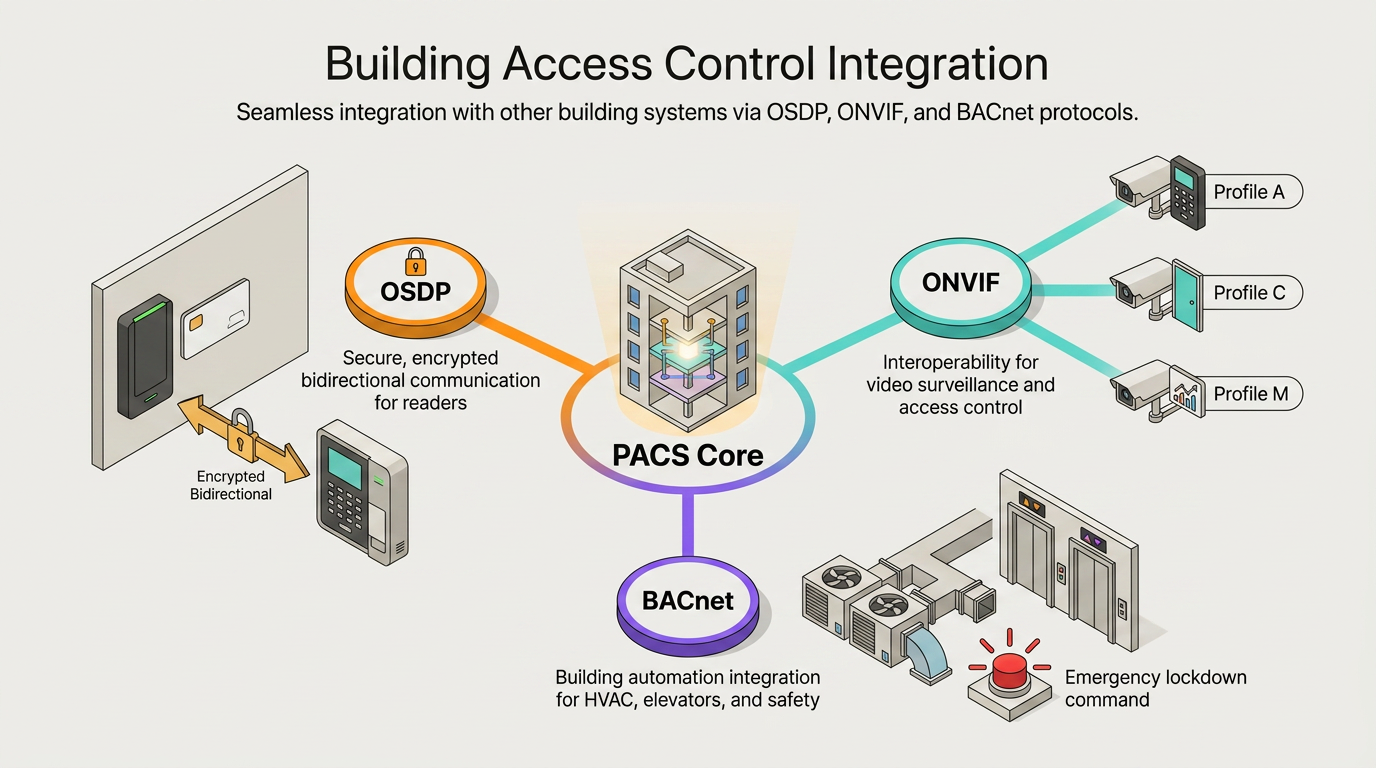
A building access control system rarely operates in isolation. Three open standards govern the most common integration patterns.
OSDP secures the reader-to-controller layer and carries device status and related events upstream to monitoring platforms.
ONVIF profiles govern video system interoperability. Profile C covers basic IP-based access control and event management, Profile A enables multi-vendor panel and software configuration, and Profile M handles metadata and analytics. PACS-to-VMS integration is typically handled via PACS or REST APIs and direct connectors.
BACnet integrates building automation and control systems with access control. Practical uses include HVAC activation triggered by badge-in events, lockdown commands propagated from the building management system to access control during emergencies, and elevator access tied to credential permissions.
Organizations that accept proprietary protocols or closed APIs at any of these integration points assume long-term vendor lock-in and unplanned capital costs at every refresh cycle.
How to Evaluate a Building Access Control System
A structured procurement framework helps facility security leaders compare systems on security, operations, and long-term flexibility.
- Standards conformance. For federal facilities, compliance with HSPD-12 is mandatory for executive agencies, while the applicability section of each FIPS specifies when that particular standard is mandatory. NIST SP 800-116 provides recommended best-practice guidance. Verify that the vendor holds a GSA Approved Products List number and maintains it as requirements evolve.
- Risk-based area classification. Buildings rarely have uniform risk across every door. Confirm the system supports differentiated authentication within a single deployment, from lobby to executive suite to data closet.
- Total cost of ownership. Migration planning should account for hardware, installation, operator training, and credential provisioning. Request a multi-year TCO model from vendors rather than a bill of materials.
- Cybersecurity posture. Verify OSDP with Secure Channel for reader-to-controller communications, VLAN isolation of access control network traffic, and a published vulnerability disclosure process.
- Open standards support. Specify OSDP, ONVIF Profile A, and BACnet compliance in the RFP. Avoid Wiegand-only deployments in new installations; prefer OSDP for new deployments.
Beyond these five, evaluate scalability across sites and credential types, lifecycle management including published end-of-life policies and firmware update capabilities, and cross-functional governance readiness. Mobile credential deployment alone can require participation from IT, IT operations, InfoSec, and governance functions before the application can be installed. Governance structures must be in place before procurement, not after.
What is the difference between Wiegand and OSDP protocols, and why should new building access control installations avoid Wiegand-only deployments?
Wiegand transmits unencrypted data one-way, preventing remote detection of reader tampering or malfunction. OSDP encrypts bidirectional communication, supervises device health, and supports device management capabilities. Avoiding Wiegand-only deployments future-proofs security posture and reduces field maintenance costs.
How can building access control systems prevent tailgating and piggybacking without negatively impacting the flow of authorized personnel?
Integrate optical turnstiles with fast throughput lanes that open only after credential validation, maintaining single-person enforcement while minimizing queues. Couple this with AI-powered video analytics at entry points to detect unauthorized followers and alert operators in real time.
Which compliance frameworks apply to building access control systems, and how do requirements differ between federal facilities and private commercial buildings?
Federal facilities face mandatory requirements under HSPD-12 and FICAM, supported by contractor credentialing requirements in federal procurement rules and agency compliance oversight. Private commercial buildings encounter sector-specific obligations like HIPAA or SOC 2, triggered by the data they handle rather than ownership status.
