Mobile Access Control: How Smartphone Credentials and Apps Replace Cards
Learn how smartphone credentials use NFC, BLE, and UWB to replace access cards, and what security teams must know about relay attacks, revocation, and readers.
Mobile access control moves the badge from the lanyard to the phone. This shift raises operational and security stakes, making the migration more consequential than a simple badge-format upgrade.
Key Takeaways
- A hardware-backed smartphone credential resists cloning because its authentication key is designed not to be exported from the device.
- Relay attacks remain possible after moving to phones. Attackers can forward Bluetooth exchanges when proximity depends on signal strength, while a deliberate tap or time-of-flight ranging helps close that gap.
- A reader that still accepts legacy low-frequency proximity cards can be downgraded to its weakest technology, wallet badge or not.
- When an integration maps wallet badges and vendor apps to the same access control event fields, an operations center sees a phone access event the same way it sees a card swipe.
How a Smartphone Becomes a Credential
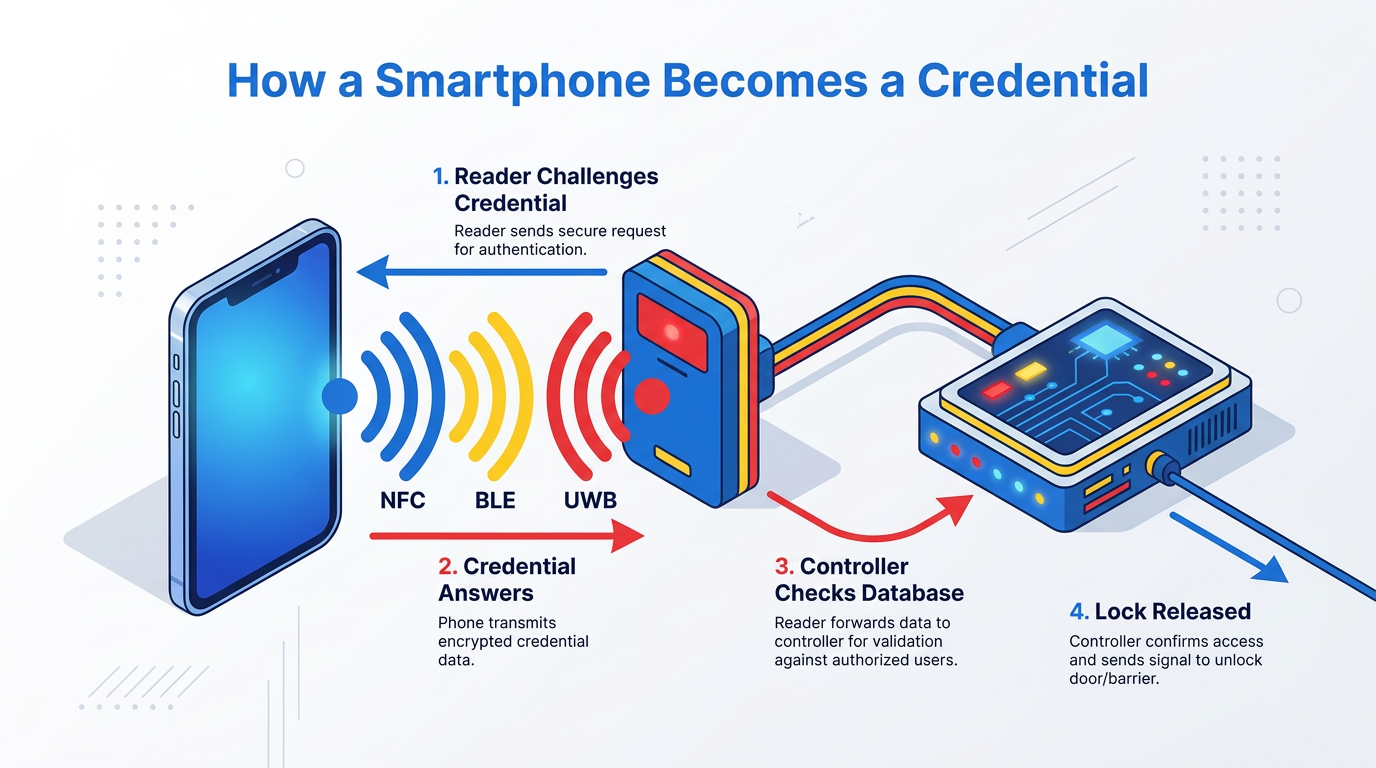
A physical access control system (PACS) treats a phone like a card: the reader challenges the credential, the credential answers, and the controller checks that answer against its database before releasing the lock. What changes is the radio carrying the exchange and where the secret lives on the device.
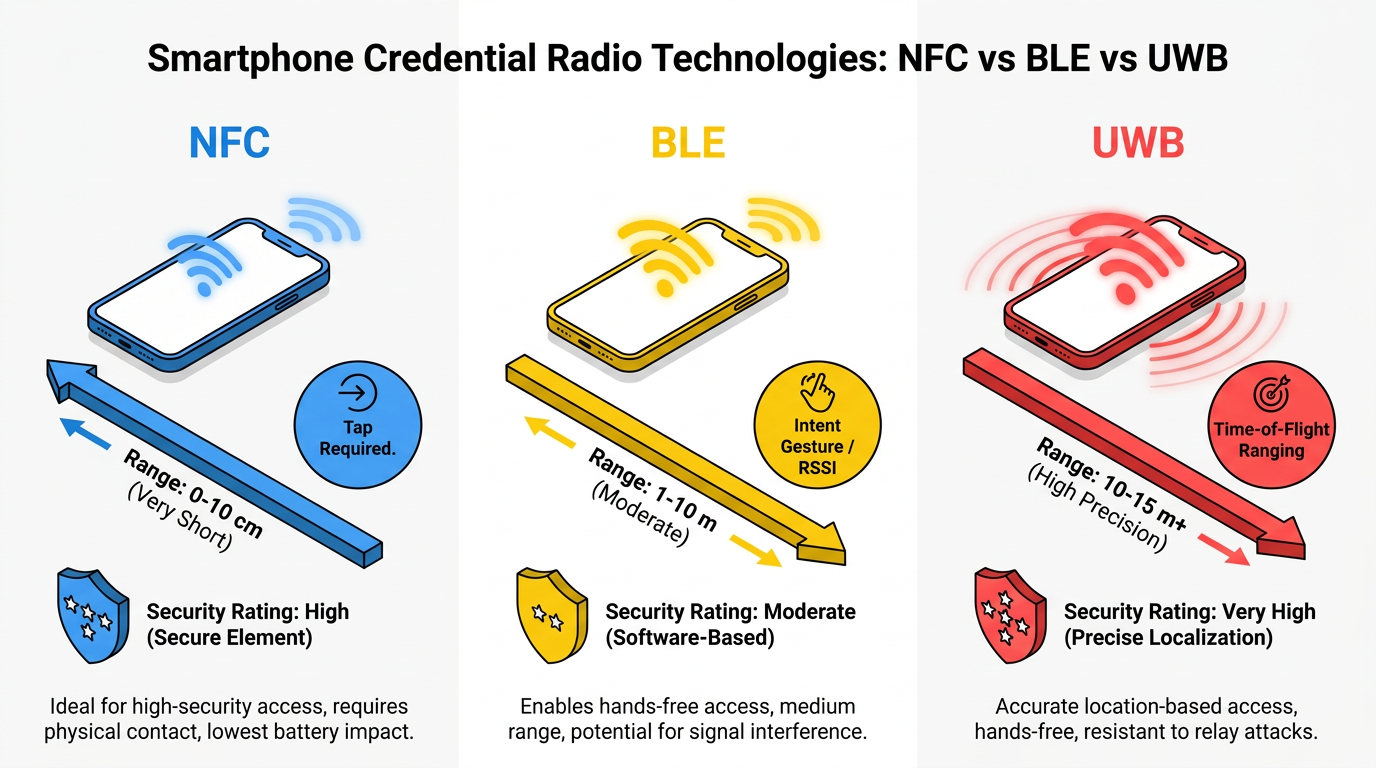
Phones reach the reader over Near Field Communication (NFC), Bluetooth Low Energy (BLE), or ultra-wideband (UWB), each striking a different balance between hands-free convenience and proof that the user is at the door.
NFC and Card Emulation
NFC has a short practical read range. That short range is itself a security control because the user has to hold the phone against the reader. In card emulation mode, the phone answers reader commands exactly as a card would.
Where the phone stores the emulated card matters more than the radio. The phone can emulate the card from a secure element (SE) or from software. With an SE, the NFC controller routes reader traffic directly to a dedicated tamper-resistant chip. This keeps the credential key isolated from the phone's operating system.
Host card emulation (HCE) takes a different route. An app answers the reader, and keys sit in a software keystore backed by a trusted execution environment (TEE), or the app pulls limited-use credentials from the cloud when needed. Code obfuscation and rooting detection harden the app against tampering. Security in an HCE deployment tracks the platform and credential architecture behind it.
That distinction shows up at the door. A credential held in the secure element responds locally and still opens the door when the phone is offline, while an HCE design that reaches for a cloud token can stall.
BLE and Proximity Judged by Signal Strength
BLE works at far greater range than NFC, so a BLE credential can open a door while the phone stays in a pocket. Depending on the implementation, the reader can estimate distance from the received signal strength indicator (RSSI), the latency of a cryptographic challenge-response, or both. RSSI should not be relied on alone as proof of proximity. In practice, BLE credentials generally require the user to show intent. Opening the app can show that intent. Other implementations use a motion or a tap on the door.
UWB and Time-of-Flight Ranging
UWB measures distance by timing how long a pulse takes to travel between phone and reader. When secure ranging and current countermeasures are implemented correctly, using propagation time makes a UWB range far harder to fake than an RSSI reading. In access control, UWB works alongside BLE and NFC.
Wallet Badges Versus Access Control Apps
The radio determines how the phone talks to the door; where the credential lives on the phone determines who controls the enrollment experience. A wallet badge can be stored on the device's secure element rather than in ordinary app storage. A reader can demand on-device authentication for sensitive doors.
App-based credentials issued through an access control vendor's own app give administrators more control over enrollment, user experience, and features than a wallet badge, but their security depends on how the vendor built the app and how the phone's operating system exposes NFC and BLE to it.
They can run over NFC or BLE through a vendor software development kit and support hands-free door opening over BLE. Requirements around device state, such as screen unlock or biometric confirmation, differ across iOS and Android builds.
Why the Phone Is Harder to Clone Than the Card
Legacy proximity cards can broadcast a fixed identifier without encryption. An attacker within read range can capture and copy it. By contrast, stronger smart-card designs use encryption and mutual authentication.
A mobile credential built on an SE, or on a TEE implementation that generates and retains a non-exportable key, follows the same security principle and adds remote lifecycle control. In that design, the private key is generated inside the hardware and is designed not to be exported, so authentication is a public-key challenge-response that depends on access to the chip.
The capability cards lack is revocation at a distance. A lost plastic card stays valid until an administrator deactivates its number in the system and, ideally, recovers the card itself. A mobile credential works differently: deactivating it in the console blocks entry as soon as the update reaches each server, panel, or controller, and the credential data is wiped from the phone the next time the device comes back online.
Attacks That Target Mobile Credentials
BLE Relays and Secure Ranging
Hardware-backed keys stop direct key copying, but the most practical attacks against mobile credentials never touch the key. A relay attack forwards the radio exchange between a legitimate phone and a legitimate reader so the reader believes the phone is present. Encryption does not prevent this on its own, since the attacker never needs to read the traffic.
Requiring a deliberate gesture on the phone, such as a tap or an in-app confirmation, removes the passive victim the attack depends on. Time-of-flight ranging measures how long the credential takes to respond, and a precise enough distance bound catches the extra delay a relay introduces. UWB does this natively, and newer Bluetooth ranging capabilities apply the same round-trip principle over BLE. When specifying readers, buyers should confirm with each vendor which of these distance-measurement defenses are actually implemented in the shipping product, rather than listed on a roadmap.
NFC Relays and Downgrade Attacks
NFC exchanges can also be relayed, and the standard defense is for the reader to time how quickly the credential responds. A relayed answer arrives late enough for a well-tuned reader to reject it.
The bigger problem is the downgrade attack, and it outlasts the migration itself. Deploying phones does not remove the older card formats a reader was configured to accept, so a reader that reads both a wallet badge and a legacy proximity card is only as secure as the weakest of the two. An attacker with a cloned copy of that old card opens the door just as easily as an authorized employee with a phone. The fix is manual: an administrator must go into each reader and switch off every card technology the site no longer uses.
What Changes at the Reader and Controller
Securing the Reader-to-Controller Connection
Once the reader knows the phone is genuine, that trust still has to survive the short cable run back to the access control panel. On older wiring, the reader hands the credential data to the panel as a plain text string of bits, with no encryption and no way for the panel to verify the reader on the other end. All the cryptography the phone performed at the door is lost the moment the reader speaks to the panel. A secure reader protocol closes that gap by encrypting the credential in transit, letting the reader and panel talk in both directions, monitoring the reader for tampering, and allowing remote firmware updates.
The protocol only helps when its secure mode is actually enabled. Many deployments run it unencrypted during setup and never enable encryption, which puts credential data back in the clear and defeats the point of the upgrade. Treat basic mode as an install-time step, not a permanent state. On the physical side, most sites can keep their existing mounting hardware, power supplies, and cabling after testing, and protocol converters let a team upgrade panels in phases rather than all at once.
Reader Technologies and Interoperability
Readers need NFC, BLE, or both, plus support for the wallet technologies the workforce will actually use. Two hardware approaches meet that need:
- Multi-technology readers accept proximity cards, smart cards, NFC, and BLE in one housing.
- BLE add-on modules hidden in a wall or ceiling next to an existing reader can add phone support without replacing it.
Evaluate wallet and reader interoperability alongside the security of the reader-to-controller connection. A reader specified for a migration should support the chosen wallet and app credentials without leaving unused legacy technologies active.
Running Mobile Credentials Day to Day
Provisioning, Revocation, and BYOD
Once the readers accept phones, the operational load moves to the credential lifecycle. Many platforms support remotely administered provisioning. The administrator issues the credential from the console, and the employee receives an emailed link or an app prompt. The badge can then land on the phone without IT touching the device.
PACS platforms that connect to the HR system can issue and revoke credentials as employment records change. That same link is what makes offboarding immediate at the server. When HR marks a contractor's engagement complete, the same transaction should revoke the credential, with no queue waiting on a badge return.
Bring-your-own-device (BYOD) programs make the lifecycle harder. Once the employer's credential lives on an employee's personal phone, the company has some reach into that device it wouldn't otherwise have, and employees notice. Access control is actually the least invasive use of that reach. An access-only credential wakes up when the phone is near a reader, logs the door event, and goes quiet again; it doesn't follow the phone around campus in between. It can also be turned off from the console without touching anything else on the device, which is a different action from a full mobile device management wipe and runs on a different clock.
A revoked credential stops working at each door as soon as that door's server or panel gets the update, whereas a remote wipe waits until the phone is back online. A BYOD user agreement should spell out which of the two the employer will reach for, and under what circumstances.
Fallback Credentials and Visitors
Deployment plans should include a fallback path. A dead battery, software glitch, or app that fails to load can prevent the phone from opening the door, so many organizations keep a physical card or a front-desk temporary credential path alive. Many run cards and phones in parallel through the transition, which is another reason the readers have to accept both.
Visitors fit the same pattern in reverse. An emailed credential can be scoped to the areas and hours of the visit and set to expire automatically when the visitor leaves.
What a Mobile Access Event Records
When the integration maps mobile and card credentials to the same PACS event fields, the controller records a phone access event with the same fields it records for a card: credential identifier, door, timestamp, and the granted or denied result. Access control systems can carry those events to a video management system alongside door state events. Common alarm states include door forced open and door held open. An integrated system can also support external authorization. The access controller can then approve or deny a request at a door in real time.
Planning the Move from Plastic to Phone
Moving credentials to the phone raises the ceiling on access control security only when the wire behind the reader, the radio at the door, and the console lifecycle pull together. Hardware-backed keys, secure ranging, and encrypted reader links each carry part of the load, with disciplined revocation closing the loop. A specification naming all four makes the migration a genuine security upgrade.
Frequently Asked Questions
How do you prevent downgrade attacks when transitioning from legacy cards to mobile credentials, and when is it safe to disable older card technologies on multi-technology readers?
Disable older card technologies only after verifying all users have enrolled in mobile credentials and backup workflows are operational. Conduct a site-wide audit to identify readers needing legacy support, then disable formats progressively by location to catch enrollment gaps before stranding users.
What are the practical differences between secure element (SE) and host card emulation (HCE) credentials for mobile access control, and how do they affect offline functionality and security?
Secure element credentials process authentication on a tamper-resistant chip, maintaining isolation if the OS is compromised and functioning without network connectivity. Host card emulation credentials depend on software keystores or cloud tokens, requiring network availability and exposing larger attack surface.
What specific steps should organizations take to secure the reader-to-controller connection during a mobile access control deployment, and how can they verify that encryption is actually enabled rather than running in basic mode?
Organizations should implement a secure reader protocol with verified encryption enablement through panel configuration audits and credential-data packet inspection. Deploy test readers to verify encrypted transmission, document encryption activation procedures for installers, and schedule post-installation verification sweeps checking each panel's encryption status.
