Office Building Video Surveillance Explained: Cameras, Storage, and Compliance
Learn how to design an office building video surveillance system, from camera placement and VMS configuration to storage planning and legal compliance.
An office building video surveillance system combines zone-appropriate camera hardware, recording software, workflows and a layout plan that produces forensically usable footage. Backlit lobby vestibules demand true wide dynamic range, and retention policies drive storage budgets across every floor. Security directors get the best results when they decide camera selection, VMS configuration, and zone-by-zone placement as one program rather than three separate procurement tracks.
Key Takeaways
- Match each camera form factor and specification to the conditions and security objective of its assigned zone.
- Design placement around entrances, circulation paths, restricted spaces, parking structures, and loading areas.
- Assign recording modes, storage, and deployment architecture based on each area's risk and traffic patterns.
- Document business justification, privacy exclusions, retention policies, and monitoring notices as part of the program.
Office Building Video Surveillance Explained
Office building video surveillance is the coordinated program of cameras, recording software, and placement decisions that produces reliable visual evidence across a commercial workplace. It covers entrances, circulation paths, restricted rooms, parking structures, and loading areas, matching camera type and specification to each zone's lighting, traffic, and risk profile. The program also defines recording modes, storage capacity, retention windows, and legal notices so footage stays admissible when an incident reaches HR, legal, insurance, or law enforcement review.
Common Risks in Office Building Surveillance
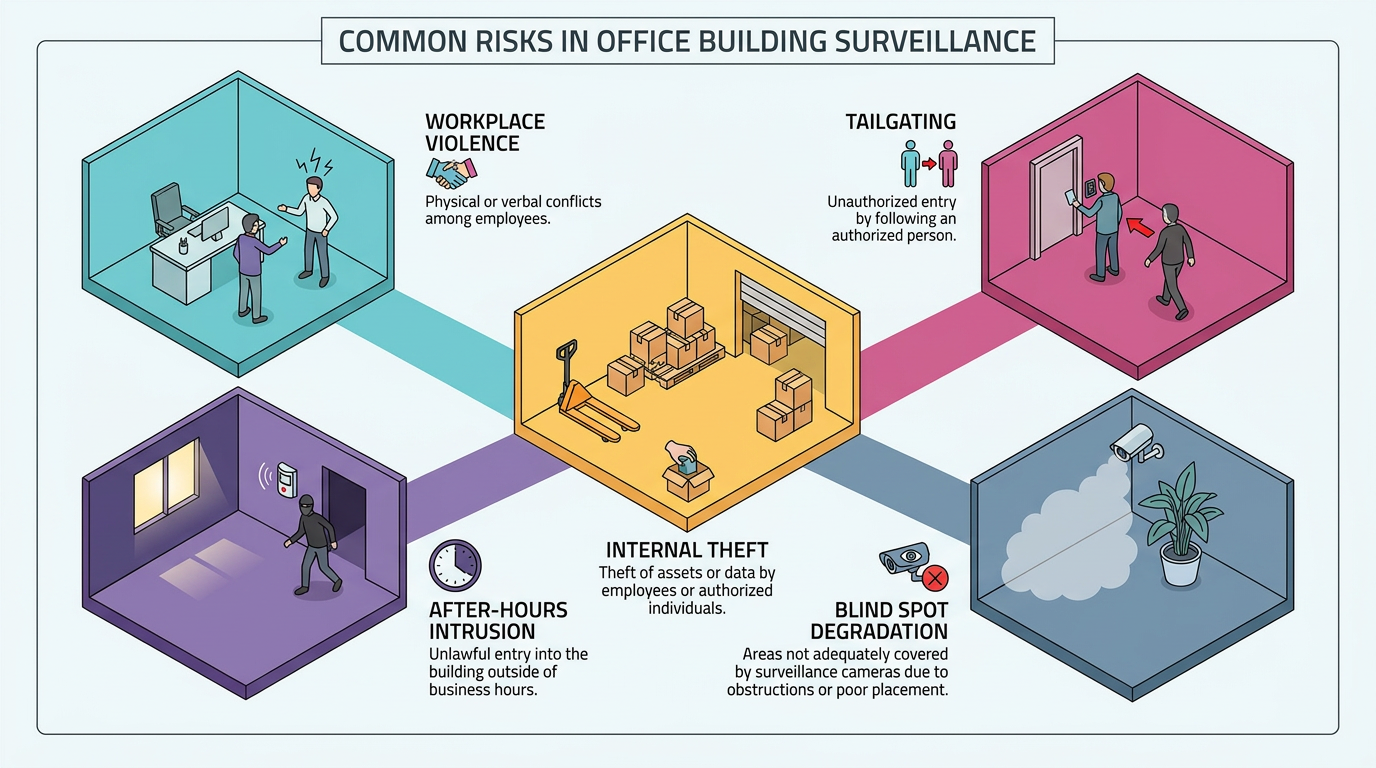
Office buildings face a recurring set of threats that camera placement and recording policy must answer for directly. Federal data counted 57,610 nonfatal workplace violence cases requiring days away from work, job restriction, or transfer across 2021 and 2022, the kind of incidents that demand a defensible video record for HR, legal, and law enforcement.
More recent BLS violent-acts data counted 78,340 private-industry cases involving days away from work, job restriction, or transfer across 2023 and 2024 combined, using the same biennial measurement window.
The risks worth designing around:
- Workplace violence and hostile entries. Coverage at entrances, lobbies, and shared circulation paths supports both real-time deterrence and post-incident reconstruction.
- Tailgating at controlled entries. One badge swipe can move two or three people through a door without an audit trail, so cameras at access-controlled thresholds should be paired with the reader event stream.
- Internal theft and asset diversion. Loading docks, mailrooms, and shared storage combine high traffic with portable goods; coverage should follow the path between staging and exit, not just the dock face.
- After-hours intrusion. Motion-triggered recording paired with alarm correlation shifts the camera's role from documentation to detection.
- Blind spots that creep in over time. Glare from new glass facades, obstructions from signage or construction, and lens degradation all erode coverage. Periodic field-of-view audits keep cameras matched to current site conditions.
Each of these risks maps to a specific hardware, placement, or VMS decision, starting with the camera form factor at every location.
Choosing the Right Camera Type for Each Office Zone
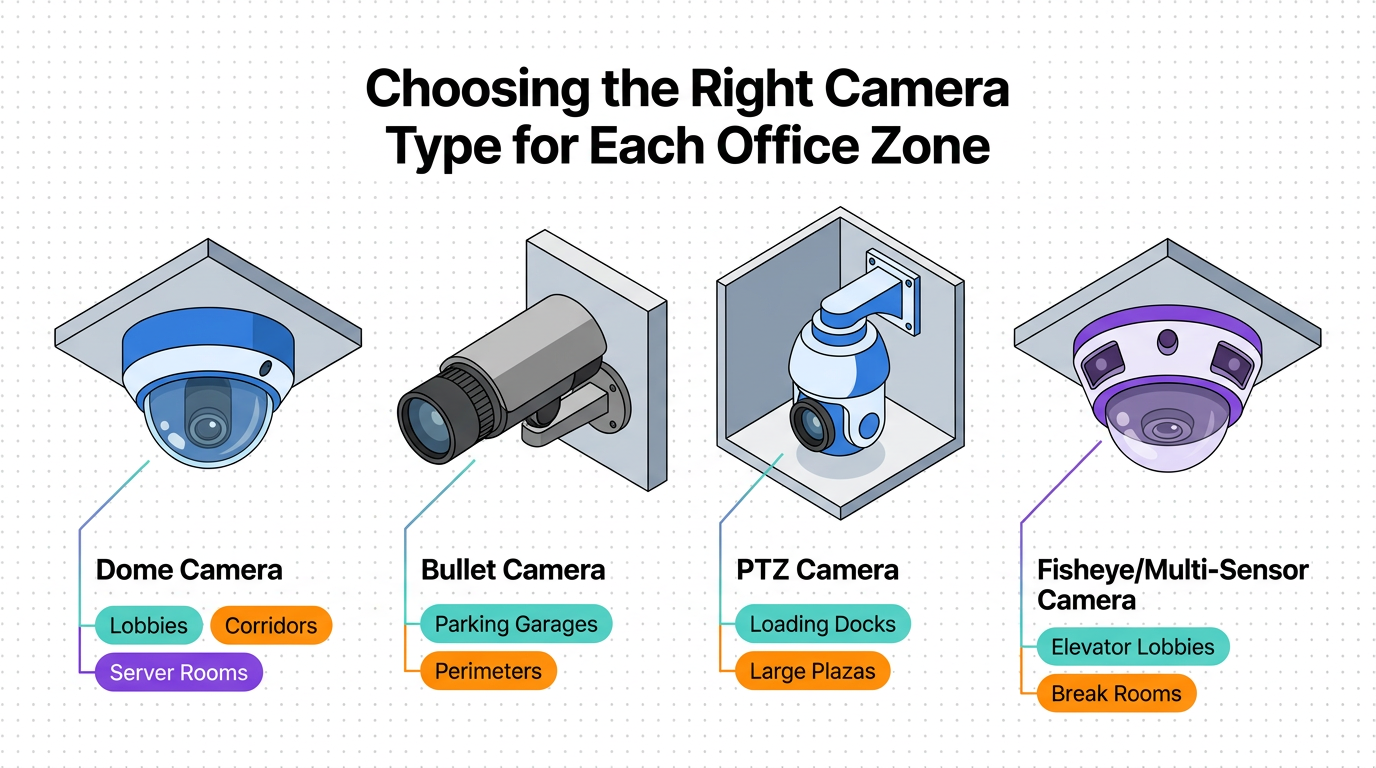
Office buildings present a mix of interior and exterior environments, each favoring a different camera form factor. The right choice at each location balances deterrence, evidentiary quality, and the realities of ceiling height, lighting, and cable runs.
Dome cameras are the workhorse of interior office surveillance. They blend into finished ceilings, and the tinted dome can conceal the lens's direction, limiting an insider's ability to game coverage. That concealment, combined with tamper-resistant housings and the ability to route cabling above the tile, makes them a strong fit for lobbies, corridors, server rooms, and open-plan floors.
Bullet cameras serve a different purpose. Their visible, cylindrical profile creates an overt deterrent, and they are often used to monitor specific areas or directions. Security teams typically deploy them along long corridors, parking garage drive lanes, and building perimeters where license plate capture matters at the curb cut or garage entry arm.
PTZ cameras add operator-directed flexibility. A GSOC operator can pull in on an unattended bag in the lobby, a face at the loading dock gate, or a plate at the visitor entry to capture the detail a fixed camera would miss. Preset tours also give parking decks and large plazas continuous patrol coverage without adding fixed cameras at every angle.
Fisheye and multi-sensor cameras reduce total camera count. A single ceiling-mounted fisheye covers an entire elevator lobby or break room, though the image needs client-side or server-side dewarping to produce a usable rectilinear view for an investigator. Multi-sensor units use discrete lenses to avoid fisheye distortion at the edges, which makes them practical for parking lot corners, atriums, and large open floors.
Specifications That Determine Usable Footage
Form factor sets the housing; specs decide whether the footage holds up.
- Pixel density, not resolution. Identification-grade footage depends on pixels per meter at the actual subject distance and the lighting at that hour, not megapixel count.
- True WDR at lighting transitions. Vestibules with floor-to-ceiling glass need sensor-level WDR. Digital "WDR" or backlight compensation often leaves silhouettes at the door.
- Codec choice drives storage and evidence. H.265 cuts bitrate versus H.264 at similar quality, a strong fit for high-resolution cameras on continuous record. Aggressive compression, though, wrecks the license plate, logo, or hand on a door handle in the frame that matters.
Pixel-density requirements should identify the framework and edition being used. IEC 62676-6 establishes a framework for performance testing and grading of real-time intelligent video content analysis used in security applications. Teams using older DORI labels should not mix those thresholds with the current framework in specifications or acceptance tests.
Zone-by-Zone Camera Placement
With form factors and specs settled, placement addresses the risks above in floor-plan terms. Camera layout in office buildings may be informed by broader security design considerations, including surveillance principles from Crime Prevention Through Environmental Design (CPTED).
Cameras extend natural surveillance where architectural sightlines fall short, monitor defined access pathways, and signal monitored territory to anyone considering a hostile act. Cameras supplement good architectural design; they do not replace it, and security professionals conducting a site survey should review sightlines, lighting, and landscaping before counting camera positions.
Entry Points and Lobby Areas
Primary entrances require identification-quality pixel density at the door width, plus true WDR to handle backlight from glass facades and vestibules. Coverage should span the approach path from visitor parking through the vestibule, queuing area, and the transition from public to access-controlled space. Federal requirements for FSL Level II facilities specify that landscaping must not obstruct camera views at these locations, a useful benchmark for private-sector tenants in similar exposure profiles.
Lobby cameras should cover the angles reception staff and front-desk officers cannot see directly. That typically means blind spots behind columns, under mezzanines, and at elevator call stations where a tailgater can wait for a badged employee. The goal is to extend the front-desk line of sight, not duplicate it.
Corridors, Stairwells, and Vertical Circulation
Every corridor intersection, T-junction, and L-turn creates an architectural blind spot the camera plan must address. Placement must also avoid backlight from end-of-corridor windows and overhead fluorescents that wash out the image at the exact spot a person's face would appear.
Stairwells need cameras at the entry and exit doors on each floor landing, coordinated with access control readers on the stairwell side. Standard stairwell lighting is dim and uneven, so low-light or IR capability is usually a requirement rather than an upgrade.
Parking Structures
Parking garages demand coverage at three distinct zones:
- Vehicular entrances and exits, where plate capture and driver identification are the priority.
- Pedestrian stairwell landings, which are isolated transition points with limited natural surveillance.
- Elevator vestibules, where employees move between the deck and the lobby.
Mounting height on exterior and perimeter cameras should preserve sightlines into travel lanes and approach paths without exposing the housing to easy reach. Wired transmission is usually the more practical choice in decks built from heavy concrete, where wireless backhaul struggles between levels.
Loading Docks, Server Rooms, and Open-Plan Floors
Loading docks function as a distinct security zone. Most office buildings channel deliveries through a single staffed dock with camera monitoring, which makes that area both the busiest and the most exposed handoff point in the building. Coverage should include the full dock face, the receiving and staging area, and the recessed bay blind spots where a pallet can sit unobserved.
Server rooms, MDF and IDF closets, and other technical spaces require identification-quality resolution at the entry door. Different access control levels typically apply based on asset risk, and the video record is what closes the loop when a reader audit log shows an after-hours entry.
Open-plan workspaces present a different calculus. CPTED principles, including natural surveillance, can improve visibility in open-plan offices during occupied hours. Coverage focuses on floor access points such as elevator banks and stairwell exits rather than individual workstations, with full floor-plate motion detection activated after hours when the natural surveillance disappears.
VMS Architecture and Deployment Models
Cameras and placement only deliver value if the software behind them records, retains, and surfaces the right footage. The video management system sits at the center of the surveillance architecture, handling camera ingestion, recording to storage, analytics processing, and the operator interface that GSOC and roving officers use every shift.
Recording Modes and Storage Planning
Recording mode should match the risk and traffic pattern of each zone defined above:
- Continuous recording suits high-security areas such as server rooms, main lobbies, and loading docks.
- Motion-triggered recording activates only on detected movement and can reduce storage consumption on lower-traffic cameras such as after-hours stairwells or rarely used side entrances.
- Event-based recording ties activation to external triggers like door-forced-open alarms from the access control system, which gives investigators a tight clip around the alarm rather than hours of empty hallway.
Storage planning starts with a bitrate-based calculation. Consumption depends on bitrate, codec, resolution, frame rate, and retention period, which is often dictated by legal hold requirements, insurance carriers, or local statute. In buildings with many higher-resolution cameras on continuous record, storage needs can easily exceed initial estimates. Codec selection, zone-based recording mode assignment, and pilot testing for actual bitrates on representative cameras should all precede storage procurement, not follow it.
For example, a storage calculation example puts one week of 2 Mbps video from 10 cameras at about 1.4 TB before adding capacity for indexing, metadata, redundancy, or operational headroom.
Surveillance-grade hard drives are the standard choice for video recording because video workloads involve sustained, near-constant write cycles that consumer drives aren't built to handle.
On-Premise, Cloud, and Hybrid Deployment
Where that storage and processing lives is the next decision. On-premise VMS keeps all video within the building network, offering full data sovereignty and no internet dependency for core recording. The tradeoff is capital expenditure on server hardware and ongoing internal IT responsibility for patching, drive replacement, and lifecycle management.
Cloud VMS, also called VSaaS, moves recording and processing to vendor-managed data centers. The subscription model eliminates upfront server costs and simplifies multi-site management for security teams responsible for several office buildings under one program. Directors evaluating cloud deployment should pressure-test data residency geography, compliance posture, and breach notification obligations against their own legal and insurance requirements.
Hybrid architectures keep latency-sensitive recording on-premises while offloading metadata, analytics workloads, and remote access to cloud infrastructure. For multi-tenant office buildings, this can also keep tenant footage logically isolated while consolidating operator views.
Regardless of deployment model, camera and control-system networks should be segmented from business networks and should not be directly exposed to the internet, consistent with CISA network isolation guidance. Patch management, unique credentials, restricted administrative access, and encrypted remote connections should be part of the operating design, not post-installation hardening.
Interoperability Standards
Whatever deployment model is chosen, ONVIF profile conformance helps reduce vendor lock-in across cameras, the VMS, and access control systems. Procurement language should specify the exact ONVIF profiles required, not a generic compatibility statement that vendors can interpret loosely at integration time. For new procurement:
- Profile T covers modern camera streaming.
- Profile G covers recording and search.
- Profile M covers analytics metadata and AI events.
Bids should identify the exact firmware or software version and verify it in the conformant database rather than relying on terms such as "ONVIF compatible," "ready," or "supported."
Legal Compliance for Workplace Surveillance
Hardware, placement, and VMS decisions all sit on top of a compliance layer that determines whether the footage is admissible and the program defensible. Video-only surveillance without audio in common areas presents different considerations than systems that also capture audio, which in many jurisdictions falls under stricter consent and wiretapping rules.
A few practices keep the program defensible:
- Document a business justification. Tie each camera's placement and operation to a specific risk such as asset protection, life safety, or after-hours intrusion, the same risks named earlier in this guide. That record helps distinguish legitimate security coverage from surveillance that could be interpreted as monitoring workplace activity unrelated to security, which is the line that draws labor complaints and litigation.
- Exclude private spaces. Restrooms, locker rooms, mothers' rooms, changing rooms, and shower areas are off-limits for camera coverage under most state laws and company policies. Placement reviews should explicitly call out these exclusions, and any camera mounted near them should have its field of view documented and audited so an inadvertent angle does not create a privacy violation.
- Set retention periods deliberately. Too short, and the footage is gone before an incident is reported; too long, and the organization carries unnecessary discovery exposure. A typical office program retains routine footage for 30 to 90 days, with longer holds triggered by incident reports, litigation holds, or insurance requirements.
- Post notice and signage. Notices at building entrances and in lobbies inform employees, visitors, and contractors that the premises are monitored, supporting the legitimate business interest argument and reducing the risk of a reasonable-expectation-of-privacy claim.
Bringing It Together
An office surveillance program is only as strong as the weakest link between the risks, hardware, software, placement, and compliance choices covered above. Cameras specified for the wrong scene, a VMS configured without zone-based recording, or a layout that ignores CPTED principles all produce the same result: footage that fails when it is needed most.
Before acceptance, commission each representative camera scene under expected day, night, and backlit conditions, then verify pixel density, alarm-linked recording, search, export, playback, timestamps, and retention against the operational requirements through pre-installation operational testing.
Security directors who treat camera selection, VMS architecture, and zone-by-zone placement as a single program, reviewed on a regular cadence with input from facilities, IT, HR, and legal, get a system that deters incidents in real time and supports defensible investigations after the fact. That is the standard worth designing toward, and it is the one that holds up when an incident actually unfolds in the lobby.
Frequently Asked Questions
How do you calculate the required pixel density for identification-grade footage at different camera distances rather than just relying on megapixel ratings?
Calculate pixels per meter at the subject's distance using sensor width, focal length, and scene width, then compare against IEC 62676-4 thresholds for your operational requirement, verifying under worst-case lighting conditions expected at that location.
What are the key differences between the legacy DORI framework and the current IEC O2DCPVS framework for specifying camera image quality requirements?
The legacy DORI framework defined four fixed thresholds using pixels-per-meter values without accounting for scene complexity or lighting. IEC guidance for video surveillance performance focuses on testing, grading, and operational requirements for security applications.
How should security teams segment surveillance camera networks from business networks, and what specific cybersecurity measures should be implemented to protect the VMS infrastructure?
Camera and control-system networks should use VLANs or physically separate switches isolated from corporate IT. Implement firewall rules restricting traffic to essential ports, deploy network access control for device authentication, enable TLS for camera streams, and establish jump hosts for administrative access.
