Commercial Access Control Systems for Office and Multi-Tenant Buildings
Learn how commercial access control systems work, from controller architecture to tenant data partitioning, credential security, and offboarding best practices.
Commercial access control decides, minute by minute, who reaches a tenant floor, a server room, or an executive suite, and who is turned back at the reader.
In a multi-tenant office tower, one physical system must serve a property manager and every tenant on the rent roll without exposing one party's roster or movement history to another. Decisions made at installation determine whether the system holds up for a decade or becomes a liability as leases roll, tenants churn, and security directors turn over.
Key Takeaways
- In controller-based systems, local decision-making keeps lobby turnstiles, garage gates, and tenant suite doors operating during a server outage.
- Legacy proximity credentials and unencrypted Wiegand wiring create established cloning and replay risks that a determined insider or contractor can exploit.
- Shared buildings require native tenant data partitioning so one tenant's security team never sees another tenant's employees, visitors, or after-hours movement.
- Most access control failures in commercial buildings trace back to behavior at the doorway, so offboarding discipline, door schedules, permission audits, and hardware selection all require attention.
How a Commercial Access Control System Works
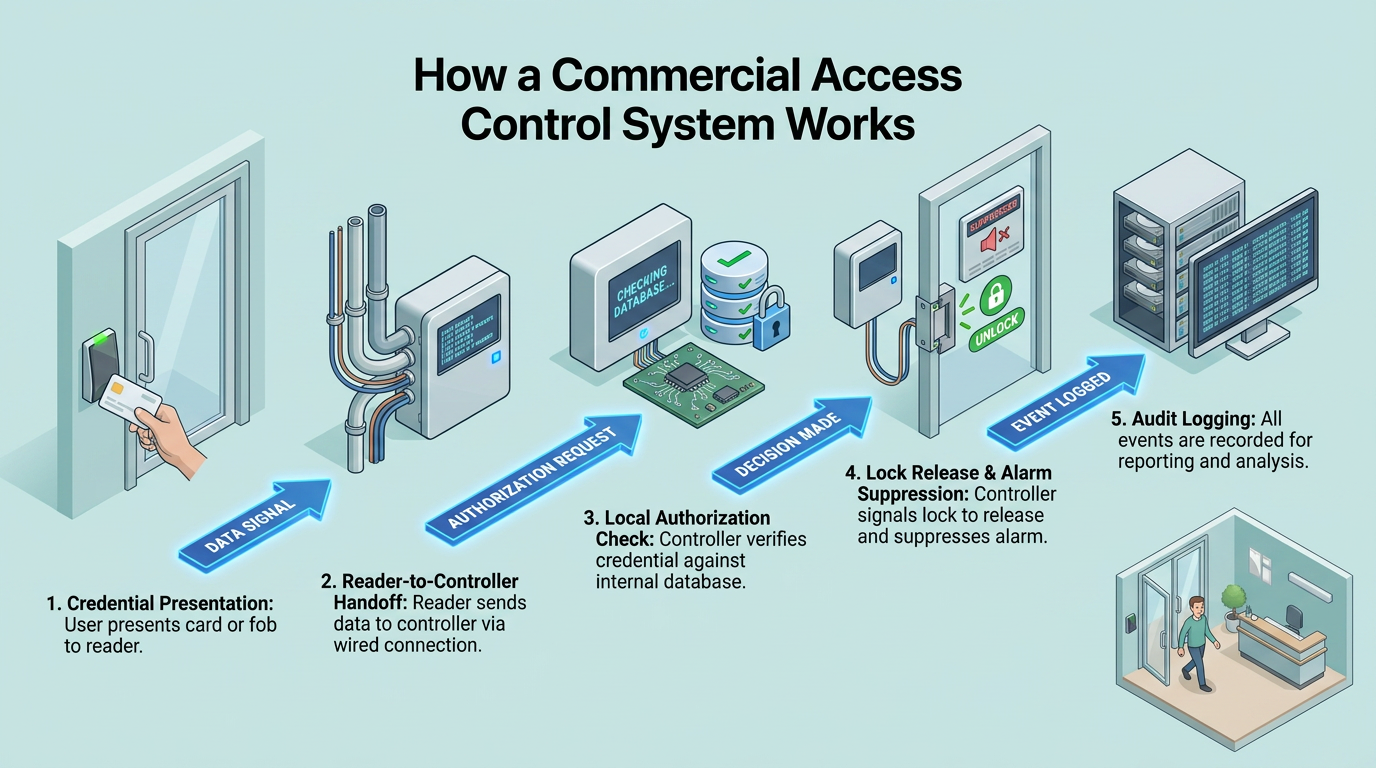
In a conventional controller-based physical access control system (PACS), the same sequence runs at every controlled door, whether it is a lobby turnstile, a tenant suite, a data closet, or a rooftop mechanical room:
- Credential presentation. A person presents a card, fob, or mobile credential at a reader mounted beside the door.
- Reader-to-controller handoff. The reader passes the credential data to a door controller, a small computer inside the secure area.
- Local authorization check. The controller checks the credential against permissions stored in local memory, confirming the holder is authorized for that specific door and time of day.
- Lock release and alarm suppression. On a valid match, the controller releases the lock, suppresses the door alarm, and relocks on closure.
- Audit logging. The controller writes the event to an audit log tied to a person, a door, and a timestamp. Denied attempts are logged too, which gives investigators a trail when a former employee tests an old badge or a contractor tries a door outside their scope of work.
In this architecture, the controller makes each access decision. The head-end server enrolls employees and contractors, provisions credentials, distributes authorization changes to controllers, and aggregates event logs for the security director and any tenant administrators. Because controllers cache access rules locally, doors keep functioning when the connection to the server drops, so a network outage does not lock employees out of their floor or trap them inside a stairwell.
At the door itself, an electric strike or magnetic lock controls the opening. The standard hardware set also includes a request-to-exit (REX) device and a door position switch. Fail-safe hardware releases the door when power is cut, and magnetic locks are typically configured fail-safe. Fail-secure hardware stays locked without power.
Qualified professionals should verify locking hardware against the listed opening and applicable life-safety requirements. A commercial building typically mixes fail-safe and fail-secure hardware, with fail-secure strikes controlling entry to tenant suites and back-of-house areas while exit hardware guarantees free egress from every occupied space.
Credential Technologies and Their Documented Weaknesses
Credential security depends in part on the strength of its cryptography, and the credential in a departing tenant's desk drawer is only as safe as the technology behind it.
Cards and Fobs
Legacy 125 kHz proximity cards still circulating in older office towers rely on fixed identifiers rather than cryptographic authentication, putting them within reach of pocket-sized cloners sold online. 13.56 MHz smart cards offer a stronger option for new installations and phased upgrades.
Credential and administrator keys can be extracted from HID iCLASS SE reader configuration cards under conditions covered by CISA's 2024 advisory ICSA-24-037-02. Readers with shared standard keys face higher cloning risk than those loaded with customer-specific keys, which matters most in high-turnover environments where former tenants and contractors may retain working cards.
Procurement should distinguish card frequency from credential generation, and reader key configuration deserves separate scrutiny. Treating all contactless cards as equivalent understates the risk to executive floors and other high-value tenants.
Mobile Credentials and Biometrics
Mobile credential keys can sit in hardware-backed secure elements, and phones can require a biometric or passcode before releasing them. For security directors tracking lost or stolen credentials, that provides a materially stronger baseline than a legacy proximity card anyone can present at the reader. The phone's operating system and app layers add their own attack surface, and a relay attack against HID's Seos platform was demonstrated in 2023.
Bluetooth Low Energy (BLE) supports a longer configured read range than tap-to-read cards, which changes how tailgating plays out at a busy lobby turnstile. Cards and mobile credentials coexist in most tenanted buildings, so reader purchases should assume a multi-format environment.
Reader Wiring and Governing Standards
Even a cryptographically strong credential can be defeated by the wiring between the reader and the door controller. In office towers built in the 1990s, that wiring often predates every credential upgrade layered on top of it, which leaves a modern smart card riding on a legacy protocol.
The legacy protocol, Wiegand, has three weaknesses that matter for security teams:
- Cleartext transmission. Card data travels unencrypted, so anyone tapping the wire can read it.
- One-way communication. The controller cannot tell if a reader has been removed, swapped, or tampered with.
- Replayable data. Captured card data can be played back at another door on the property to gain entry.
The Security Industry Association's Open Supervised Device Protocol (OSDP), approved as International Electrotechnical Commission (IEC) 60839-11-5 in 2020, addresses each of those gaps. Its Secure Channel encrypts reader traffic with Advanced Encryption Standard using a 128-bit key (AES-128) and continuously supervises the wiring, so tampering is detected in real time. Secure Channel is not on by default. Commissioning should verify that encryption is active on every reader, not only at the lobby.
Alongside the protocol question, UL 294 grades access control equipment across four performance levels: destructive attack resistance, line security, endurance cycling, and standby power. Insurance carriers and tenant security requirements often reference these grades directly, so procurement teams should confirm the grade attached to any panel or reader on the specification sheet.
Architecture Choices for Single Buildings and Portfolios
Building owners and corporate security leaders must decide where administrators manage credentials and where controllers store access rules, because that decision governs both day-to-day operations and how the system behaves during an incident.
On-premises systems keep data and administration in-house, suiting the data-sovereignty needs of law firms, financial tenants, and government leaseholders. Patches require server work, and each new site means new hardware and licenses.
Cloud-hosted access control as a service (ACaaS) shifts management to a web dashboard, with the provider pushing updates and new sites added by configuration, often the deciding factor for portfolios across multiple cities. Cloud deployments still need continuity measures such as an edge server, and a building local area network (LAN) failure can take devices down either way.
Hybrid designs pair on-premises systems at high-security sites with cloud management elsewhere. Internet Protocol (IP) edge controllers powered over Ethernet shorten wiring runs, so adding a door resembles adding a network device.
| On-Premises | Cloud-Hosted (ACaaS) | Hybrid | |
|---|---|---|---|
| Data residency | In-house servers, suits strict data-sovereignty needs | Provider-hosted, subject to contract terms | In-house at sensitive sites, cloud elsewhere |
| Patching and updates | On-site or remote server work per site | Pushed by the provider | Split by site, depending on model |
| Adding a new site | New hardware, licenses, and installation | Configuration on the dashboard | New hardware for on-prem sites, configuration for cloud sites |
| Continuity during outage | Local controllers keep doors working; LAN failure isolates devices | Requires secondary connection or edge server; LAN failure still affects devices | Inherits both models, tuned to site |
| Best fit | Headquarters, trading floors, regulated tenants | Multi-city portfolios, distributed offices | Mixed portfolios with a flagship site plus satellites |
An on-premises build is a capital cost per door, including the panel, reader, locking hardware, cabling, and installation labor. Cloud-managed systems typically replace head-end software and server costs with a recurring per-door, per-month subscription, while door hardware and installation remain capital expenses. In a multi-door retrofit inside an occupied building, labor and cabling drive the per-door total more than in new construction, and after-hours work adds further cost.
Design Requirements for Multi-Tenant Buildings
In a single-occupant headquarters, those choices complete the design. A multi-tenant tower adds a second dimension: two authorities operating one system with competing risk appetites and legal exposure.
The Authority Split and Data Partitioning
The property manager controls the base building, including lobbies, elevators, parking, loading docks, and shared corridors. Each tenant controls its suite, its visitors, and its internal policies, and the access platform must honor those boundaries in its data model.
Tenant A's employee roster and access history stay invisible to Tenant B and to the property manager's rank-and-file guards. The same applies to movement records that could reveal headcount, working hours, or client meetings. The building manager retains role-based visibility limited by lease terms and privacy requirements. Native multi-tenant support is a procurement requirement from the outset, not a customization to negotiate later.
Lease terms should define how tenants coordinate suite-level systems with the landlord, so integration points belong in writing before fit-out begins.
Lobbies, Turnstiles, and Elevator Dispatch
Optical turnstiles can run normally open, with barriers rising only when someone enters without a credential. They accept proximity cards, mobile credentials, and visitor quick response (QR) codes side by side, which matters in lobbies handling hundreds of guests during the morning rush.
Property managers control floor access above the lobby, and without it, a visitor who clears the front desk can reach any tenant. Destination dispatch systems assign an elevator when an occupant badges through the turnstile, and an inter-floor matrix keeps segmented tenants' floors mutually unreachable, though not necessarily in separate cars, which is why sensitive tenants sometimes negotiate dedicated banks. Employees may reach their floor around the clock, while amenity floors, vendors, and delivery drivers are limited to approved service windows.
Visitor Management Across Tenants
Buildings route visitor traffic centrally or through a delegated model. Central check-in happens at a lobby kiosk that alerts the host tenant; delegated models let anchor tenants run their own systems under base-building policy. Either way, pre-registration is the strongest control: hosts issue digital passes ahead of the visit, the credential lands in the guest's phone wallet, expires when the window closes, and grants elevator access to the host's floor only.
Delivery and contractor protocols deserve the same rigor so service traffic, from HVAC technicians to cleaning crews, never rides on borrowed credentials.
The Failure Modes That Matter Most
Even a well-engineered system meets a distracted employee at the doorway. Tailgating is an unauthorized person slipping through behind a credentialed one without their knowledge; piggybacking is the same entry made with the credentialed person's consent, usually someone holding the door for a stranger with coffee or a delivery. More than 90% of organizations experienced an access control failure within the prior six months, and 61% named tailgating or piggybacking.
PACS alarms map to these behaviors. A door forced open (DFO) alarm fires when the door position switch shows an opening with no valid credential and no REX signal, the pattern of a stairwell door pushed from outside; misconfigured REX detectors can contribute to false DFOs. A door held open (DHO) alarm signals a propped loading-dock or smoking-break door. Anti-passback blocks reuse of a credential without an intervening exit, but does nothing against tailgating because the tailgater never presents one. Catching that requires counting people at every ingress, through sensor-equipped turnstiles or camera-based detection.
Day-to-Day Operations, Offboarding, and Alarm Response
Revocation delays arise when HR and PACS workflows are disconnected or responsibility is split across building and tenant teams. A badge assigned to a departed employee, especially one terminated for cause, creates standing access until someone notices. Connecting the PACS to human resources (HR) systems automates revocation at termination, helping reduce the risk of a returning insider. Disable records rather than delete them, so the audit trail survives any investigation.
Audit access rights annually and watch logs for after-hours entries or access outside a person's normal pattern, such as a marketing analyst repeatedly badging into a data closet. Schedule doors to release during business hours, and back it up with policy against propping. A DFO or DHO alarm can trigger automatic camera call-up so the nearest view lands on the operator's screen with the alarm, letting them confirm whether the person entering matches the credential presented.
For corporate GSOCs and property teams, cross-referencing PACS data with live camera feeds creates unified situational awareness during alarm verification. Among professionals who red-team their access controls, 82% rate their systems effective.
Where an AI Layer Adds Threat Detection
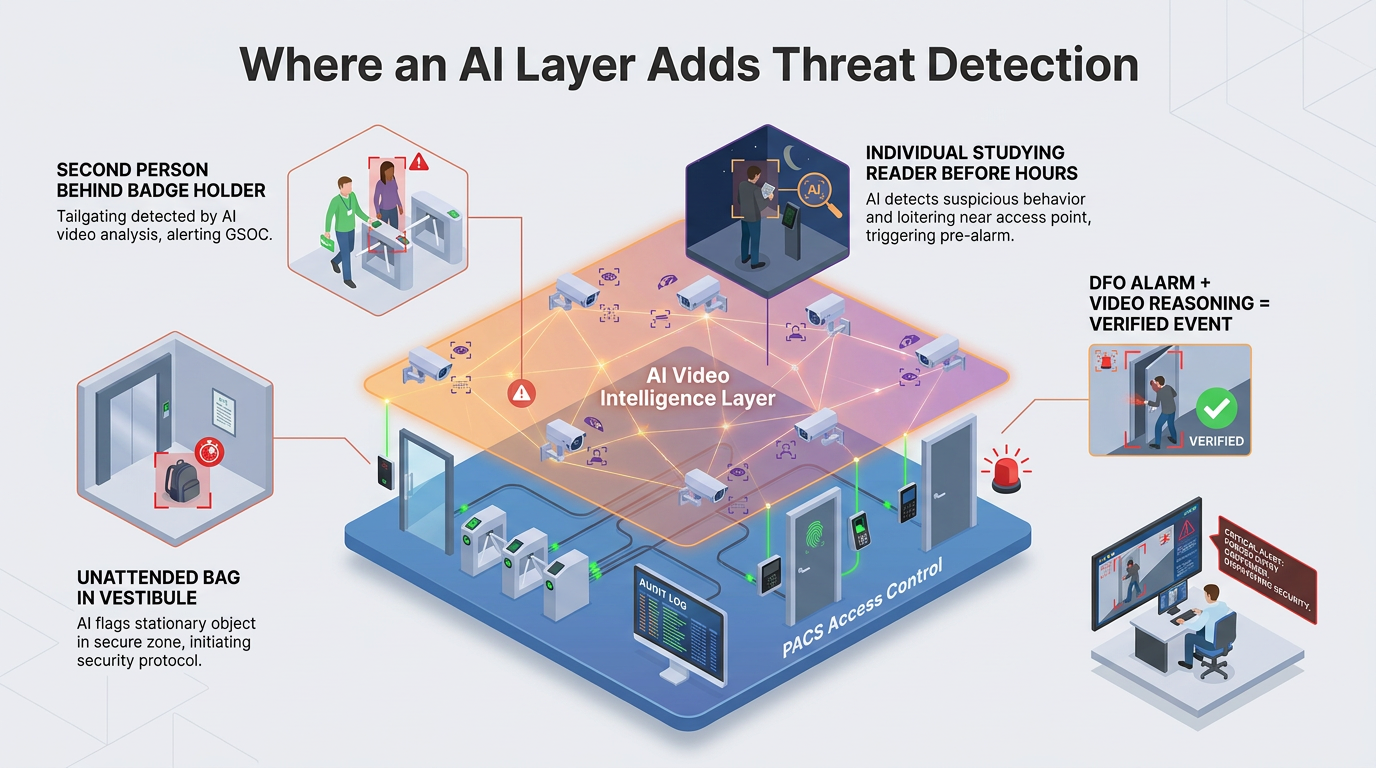
A single GSOC operator cannot watch every lobby, garage entrance, and tenant floor in real time. An AI-powered video intelligence layer running against the existing camera network flags what PACS misses: the second person entering behind the badge holder, the unattended bag in a vestibule, the individual studying a reader before business hours. A DFO alarm at a loading dock, paired with real-time video reasoning, becomes a verified event rather than a ticket to investigate.
In multi-tenant buildings, detection scoped to a tenant's corridor surfaces to that tenant's team, while base-building events route to property management, respecting the boundaries the access platform already enforces.
Design for the Long Haul
A commercial access control system stays in the walls long after the team that specified it has moved on. Judge proposals on how well they hold the fundamentals: strong credentials and encrypted wiring at every reader, controllers that keep doors working when the network drops, tenant partitioning built into the data model, and clean HR-driven offboarding.
Layer AI-powered detection on top of the cameras already in place, and the system continues to earn its keep as leases turn over and threats evolve.
Frequently Asked Questions
How do you migrate from legacy Wiegand wiring to OSDP Secure Channel in an occupied multi-tenant building without disrupting tenant operations?
Phased overnight or weekend reader swaps at each opening minimize disruption, working floor by floor. Hybrid operation allows Wiegand and OSDP readers to coexist during transition. OSDP Secure Channel must be explicitly configured before replacement begins.
What specific lease language should property managers include to define access control responsibilities and data partitioning between landlord and tenant systems?
Lease language should specify credential provisioning authority, delineate hardware funding responsibilities for demised versus common areas, establish audit retention periods, mandate advance notice for system upgrades affecting tenant integrations, and designate data ownership upon lease termination.
How does anti-passback work alongside AI-powered tailgating detection to close the gap where traditional access control systems fail?
Anti-passback prevents credential reuse by enforcing entry-exit sequences but cannot detect unauthorized followers. AI detection counts individuals passing through controlled thresholds and cross-references against credential presentations, flagging discrepancies that indicate someone entered without authorization.
