Remote Video Guarding: How It Fits into a Security Program
Remote video guarding puts trained operators on live feeds to detect and respond to threats in real time. Learn how it works and where it fits your security program.
Remote video guarding puts trained operators in front of live camera feeds so an intrusion at an unstaffed site can trigger a response while it is still unfolding. The model changes how a security program spends people and budget, but it pays off only when the surrounding detection, integration, and response controls give operators events worth acting on.
Key Takeaways
- Remote video guarding allows trained operators to assess and respond to suspicious activity while it is still unfolding.
- Video verification gives dispatchers clearer information about the presence of people and threats at a protected site.
- Remote operators extend surveillance coverage but do not replace the physical intervention provided by guards or police.
- Every monitored camera zone should connect to site instructions, integrated controls, and a named responder.
What Is Remote Video Guarding
Remote video guarding assigns staff at a central monitoring station to review video streams from a protected property, make context-aware decisions, interact with people or systems on site, and notify parties named in a written agreement with the subscriber. The service provides real-time event management, including coordinated escalation and tactical support for law enforcement.
Other names for the service include remote guarding, remote video monitoring, managed video services, and proactive video monitoring. Video verification combines live video or still images with an independent alarm signal to help an operator decide how to respond. During a virtual guard tour, an operator reviews each camera at scheduled intervals for unauthorized activity, performing the remote equivalent of a walking round.
What separates remote video guarding from other camera-based services is when and where the human makes the decision. A recorded clip pulled the next morning tells an investigator what happened yesterday. A remote operator watching the same feed from a distant monitoring center can intervene while the intrusion is still in progress, issuing a talk-down or dispatching a responder before the person leaves the frame.
How Remote Video Guarding Works
Cameras stream to the monitoring center, and video analytics do the first pass. Per-camera analytics rules can flag a line crossed at the fence or a person lingering in a zone past a set time. They can also detect an object left behind and generate an event. Routine footage need not reach an operator. That analytics pre-filtering lets a monitoring team cover cameras across multiple sites.
The operator gets the clip with site instructions. At a distribution yard, a person walking the trailer rows in the afternoon is a driver doing a pre-trip inspection; the same person early in the morning, after the gate arm is down and the last load has left, is the event the rule set exists to surface. The schedule and zone flagged it; the operator decides what it is.
Once the operator judges the activity unauthorized, the operator can use an audio talk-down over on-site speakers, which tells the person they are being watched and may deter further activity before entry. Depending on integrations, the operator can also take additional actions from the console:
- Turn on lights
- Lock or unlock doors and gates
- Call on-site staff
- Dispatch a guard
- Request police
Remote Video Guarding vs. Traditional On-Site Security
The two models solve different halves of the same problem. The table below makes the trade explicit across coverage, response, attention, and cost.
| Dimension | On-Site Guard | Remote Operator |
|---|---|---|
| Coverage | Sees one place at a time; other points only on patrol intervals. | Sees whatever analytics surface across the entire camera estate, including multiple sites. |
| Response | Physically intervenes on site: holds a door, checks a badge, delays an intruder. | Verifies, deters through talk-down, and dispatches, but cannot intervene physically. |
| Attention | Maintains focus over a smaller area but carries duties that pull them away from cameras. | Offsets fatigue with breaks, dedicated video staff, and analytics that surface discrete alerts. |
| Cost | Round-the-clock post absorbs shifts, leave, training, and vacancies. | Priced against camera count and event volume; unstaffed sites often cost less to watch than to staff. |
Where Remote Video Guarding Fits in a Security Program
A physical protection system combines detection, delay, and response. Remote video guarding supports detection and the communication half of response.
A physical access control system (PACS) raises a door forced open (DFO) event when a locked door opens without a valid credential or a request-to-exit signal, and a door held open (DHO) event when a door stays open past its preset time. With video, either event pushes the nearest camera's view to the operator, who can tell a propped loading dock door from a pried one and either phone a nearby employee or send an officer. Without video, the same alarm is a line on a panel that someone must walk to.
Alarm panels tie into the same feeds, so an intrusion signal arrives with pictures. Operators can use audio or video to distinguish activity that needs a response from environmental movement or user error. They can also identify authorized work. Guards, where the program keeps them, become the response leg: an operator who verifies an intruder at the north gate sends the officer there instead of waiting for the next round to find the cut fence.
The Verification and Response Process
Every event begins with the site rule that generated it and the instructions attached to that camera zone. Following a decision process, the operator reviews the available video, checks whether an authorized user canceled the alarm, considers the analytics, and determines whether the activity calls for intervention.
The operator changes the response according to what the video shows:
- A motion alert in an empty zone alone provides little context.
- A person inside the fence warrants closer review.
- A person prying a door supports a more urgent response.
- A wind-blown tarp removes the need for a call.
A person in frame does not by itself establish a threat, so alarm verification procedures, site instructions, and operator judgment remain central to the decision.
When dispatch is required, the monitoring center should provide the responder with:
- Location
- Camera zone
- Observed behavior
- Direction of travel
- Any apparent threat
The program should also define who receives the event when police dispatch is unavailable or inappropriate. That responder may be an on-site employee, a mobile guard, a facilities contact, or another party named in the site instructions.
Common Use Cases for Remote Video Guarding
Those response requirements help determine where remote coverage provides the most value.
Industrial and Commercial Perimeters
Perimeters at industrial and commercial sites can be well suited to remote coverage. A fence line is long, mostly empty, and hard to patrol, but it provides clean geometry for a line-crossing rule, and a talk-down delivered while someone is still outside may help deter entry rather than merely document it.
Parking Lots and Garages
Parking lots and garages also suit remote coverage because cameras can monitor vehicle entrances, pedestrian routes, payment areas, and restricted levels. Lighting, fencing, and guarding remain part of the control package because parking-facility evidence evaluates CCTV alongside other measures, and cameras alone cannot delay or physically stop an intruder.
Off-Hours Coverage
Off-hours coverage can be an attractive use case. A DFO alarm at a warehouse door overnight has less routine activity around it than the same alarm at shift change. A center that already runs around the clock can take a site at close of business and hand it back at opening, so the program can keep daytime officers while replacing or reducing an overnight post.
Construction Sites and Logistics Yards
Construction sites and logistics yards fit the same window because they have large footprints and high-value movable assets. Activity is often limited at night or on weekends. Both may change layout frequently, which can favor camera rules that an operator can adjust remotely over a fixed post.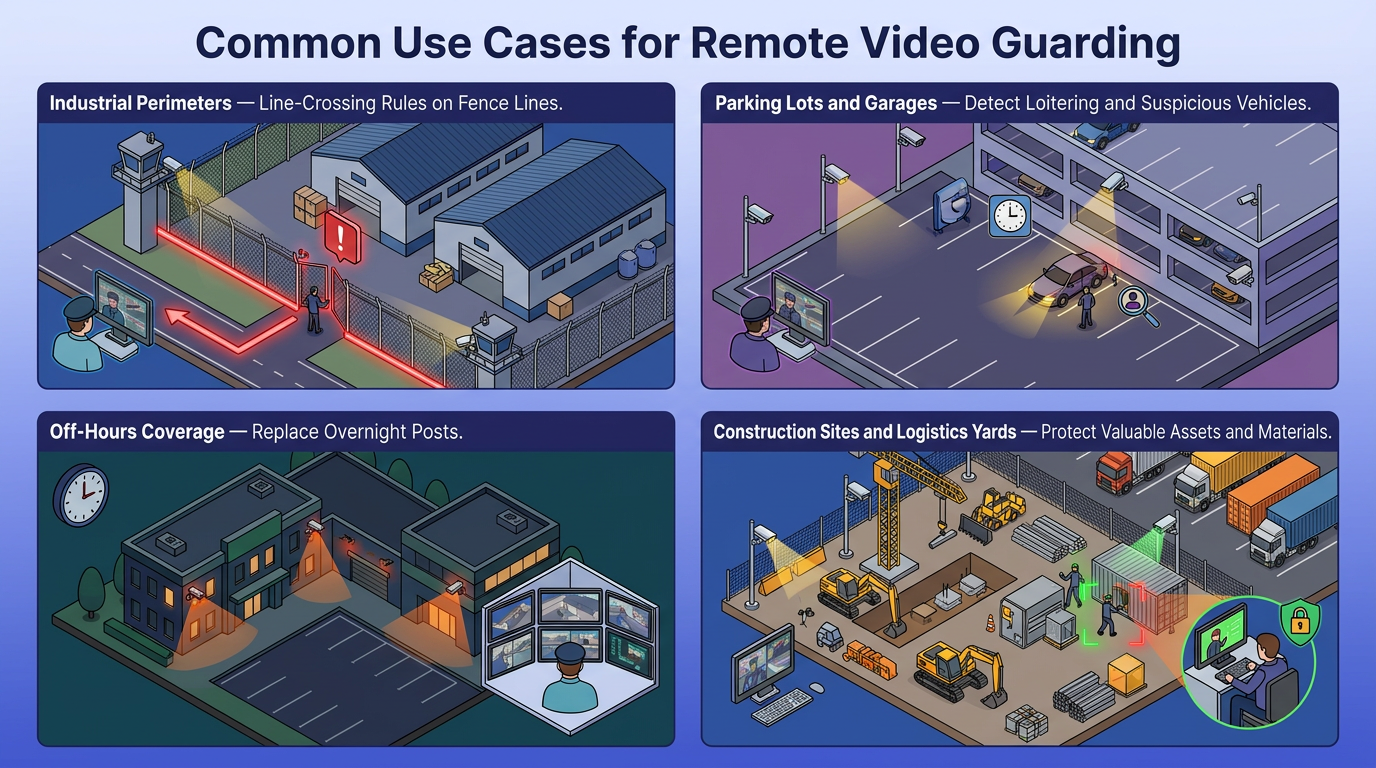
Limitations of Remote Video Guarding
Whichever operating model a program selects, verified events still depend on physical response. Police or a contracted responder must reach the location when remote intervention does not end the activity. An on-site employee can also fill that role. A site with no named responder has a gap between verification and arrival.
Analytics can trigger falsely because of visual noise and distortion in low light, backlighting, fog, and changing site conditions. Operators therefore spend part of their time validating events rather than dispatching them. A camera that was never installed, a fogged lens, or a blind corner behind a trailer stack means the event never reaches the operator.
The center also depends on the network path from site to station and, where applicable, on cloud services. Connected cameras and remote integrations create additional failure paths, so the program needs device monitoring, access controls, network resilience, and a procedure for handling lost video. Connected surveillance also introduces surveillance cybersecurity risks through cameras and their supporting third-party tools.
Where audio is configured only for talk-down, communication is one-way. The operator can issue instructions but cannot hear a response or sounds outside the camera view. Remote monitoring therefore needs barriers and access controls. It also needs a dependable response layer around it.
Verified Eyes Still Need a Responder
Security leaders should confirm that barriers provide enough delay and document a response path for every monitored zone before approving a contract or center build.
A dependable service depends on several interlocking controls:
- Resilient power and communications that keep the site online through outages.
- A documented failover plan covering primary and backup paths.
- Sufficient staffing matched to event volume across peak and off-peak hours.
- Connection monitoring that flags a lost video link between the site and the center.
These functions are part of broader monitoring center requirements, while video-specific requirements include network redundancy and bandwidth monitoring. Buyers should confirm how a provider handles an event when the primary network path, monitoring location, or on-site device becomes unavailable.
Frequently Asked Questions
How do you determine the right number of cameras and analytics rules per site to avoid overwhelming remote operators with false alerts?
Start with high-risk zones and assign one testable rule per camera. During a trial period, track false positives marked by operators, then adjust sensitivity or exclude problem areas until the verified-event ratio matches operator capacity across all sites.
What should a failover plan include when the network connection between a monitored site and the remote monitoring center goes down during an active security event?
A failover plan should route video through a backup ISP or cellular link, direct alarms to an alternate monitoring location, provide local recording with post-restoration review, and define on-site notification procedures enabling responders to act without live operator guidance until connectivity returns.
How do you calculate the cost savings of replacing overnight on-site guards with remote video guarding while maintaining an equivalent level of security?
Subtract guard wages, benefits, overtime, training, and vacancy costs from the remote monitoring fee, then add camera infrastructure, bandwidth, storage, analytics licensing, and retained responder costs. Verify analytics and remote coverage match the deterrent and intervention that on-site guards provided.
