Artificial Intelligence for Video Surveillance: Top Use Cases in 2026
Discover how AI video surveillance performs in 2026, from tailgating detection to PPE compliance, and what security teams should evaluate before deploying.
Artificial intelligence (AI) for video surveillance has shifted cameras from evidence archives to live detection tools. Systems that once recorded footage for after-the-fact review now flag events as they unfold. For security directors planning upcoming budgets, the practical question is where AI performs reliably in the field and where it still falls short.
Key Takeaways
- AI video surveillance is easier to evaluate on frequent, well-defined events such as tailgating, occupancy violations, and PPE compliance.
- Site-specific trials should measure missed detections, false alarms, verification time, and alert volume before multi-year commitments.
- Badly calibrated AI triage erodes operator trust, because repeated false alerts increase the risk that genuine alerts will be discounted.
- Credential-aware tailgating detection requires video and access control events to be correlated, and siloed systems can complicate that workflow.
Why Cameras Outgrew Human Monitoring
Detection performance declines steeply in the early phase of sustained visual monitoring before leveling off. Specialist operators show more resilience than novices and generalists, holding or even improving performance for longer stretches. Control room staff actively watch and catch incidents every shift, but there are too many feeds for any operator to absorb simultaneously, regardless of skill or dedication.
Legacy analytics added noise without changing the underlying scale problem. Rule-based systems trigger whenever a predefined threshold is crossed, such as motion in a zone or a line crossing. Rain, headlights, and animals can all trip the same rule, and the operator inherits every alert. Event-specific behavioral detection takes a different path, classifying objects and actions against defined event criteria, while some anomaly-detection systems evaluate activity against learned patterns of normal behavior.
Under validated site conditions, these approaches reduce nuisance triggers at the source. The difference shows in the output: a threshold system reports that something moved, while a behavioral system reports that a person entered a restricted dock and stayed.
The Top AI Video Surveillance Use Cases in 2026
Once systems learn what normal behavior looks like instead of firing on any threshold crossing, the same cameras can serve access control, workplace safety, retail loss prevention, and facilities management. The use cases below lead the field in 2026 because their events happen often, have clear definitions, and can be measured in a field trial.
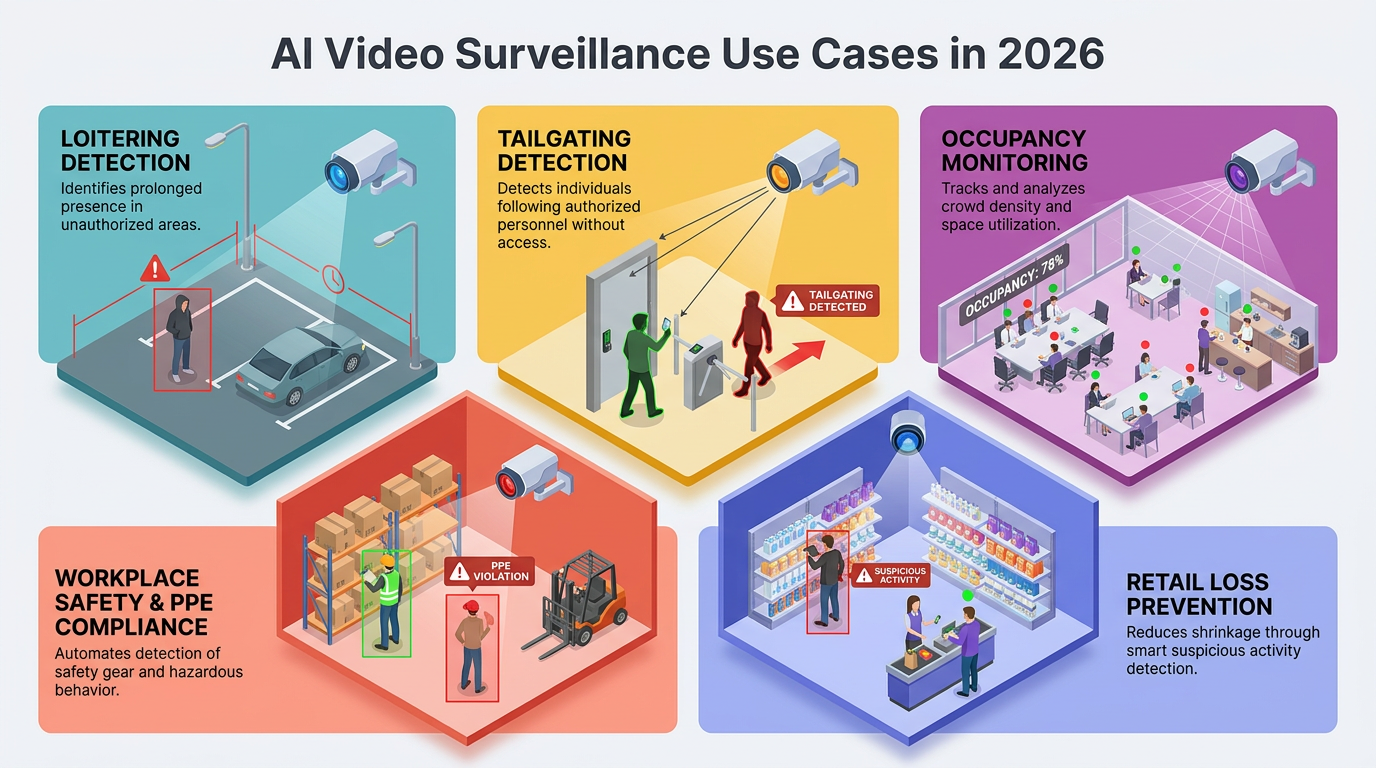
Loitering Detection
A person lingering in a parking lot is a canonical alert scenario. Time determines loitering; appearance does not. The event is presence in a zone beyond a duration threshold, in a place where lingering is out of pattern.
A contractor waiting outside the lobby at midday is routine, but the same person circling a badge-controlled parking entrance two hours after close warrants attention. Distinguishing the two requires models that evaluate sequences of frames. Thresholds still need per-site tuning, since a duration that fits a quiet lobby will flood a busy entrance.
Tailgating and Piggybacking Detection
Tailgating detection evaluates passage through an entrance, and badge logic cannot see it because the tailgater never presents a credential. The physical access control system (PACS) records one valid entry while two people walk through. Integrated video systems close the gap by analyzing footage tied to each swipe and alarming when the count exceeds credentials presented.
Siloed systems complicate deployment, and open standards lower that barrier. ONVIF's Profile M defines how analytics services exchange metadata and events with video management systems (VMS), and it pairs with ONVIF's access control profiles.
Occupancy Monitoring and People Counting
Counting people is among the tasks AI video systems handle most reliably, and accuracy was high enough for operational use across large buildings in peer-reviewed multi-camera deployments.
For security teams, that supports occupancy-violation alerts in restricted rooms, crowd detection at egress points, and after-hours presence flags. Facilities teams can track how space actually gets used and enforce life-safety limits in assembly areas. That dual payoff, security plus operations, is one reason people counting appears early in enterprise deployments.
Workplace Safety and PPE Compliance
Safety monitoring extends the surveillance investment beyond security incidents. Healthcare facilities use fall detection, and warehouses use cameras to verify that staff wear the correct personal protective equipment (PPE) on the job.
The same computer vision techniques can flag blocked emergency exits, visible spills, and improperly stacked goods, and industrial sites use configured zones to monitor areas around forklifts and powered equipment. For a site manager, cameras installed for theft and intrusion also deliver a continuous safety audit.
Retail Loss Prevention
Retailers use AI to improve emergency response dispatch, automate repetitive tasks, and filter events for assessment. Filtering matters most for national chains, since their camera estates generate more motion events in a day than any regional team could triage by hand. Retailers often pair video analytics with license plate recognition, and the combined workflow should be evaluated under both daytime and nighttime conditions, with teams tracking nuisance alarms, missed events, verification time, and alert volume.
Implementing AI on Top of Legacy Security Systems
Most security teams are not building from scratch. They are layering AI onto camera estates, VMS platforms, and PACS deployments that were specified years ago, often by different vendors and under different assumptions. The tips below help security professionals extract value from AI analytics without ripping out working infrastructure.
Inventory Before You Integrate
Start with a written inventory of every camera, encoder, NVR, VMS instance, and PACS controller in scope. For each device, record firmware version, resolution, frame rate, codec, lens type, mounting height, and network path. AI models have minimum image quality requirements, and a 720p analog camera behind a coax-to-IP encoder will not deliver the same detection performance as a native 4K IP stream. The inventory then tells you which cameras can support analytics today, which need re-aiming or lens changes, and which should be replaced during the next refresh cycle.
Prioritize ONVIF and Open APIs
Proprietary integrations lock teams into a single vendor's roadmap. Where possible, favor cameras and VMS platforms that support ONVIF profiles and documented REST or webhook APIs, since that preserves the option to swap the analytics layer without touching the underlying hardware. For PACS integration, confirm that the access control platform exposes badge events over a supported protocol before committing to a tailgating detection vendor.
Pilot One Use Case at a Site You Understand
Resist the urge to deploy analytics across the entire portfolio at once. Pick one well-scoped use case, such as loitering at a single parking structure or tailgating at one lobby, and run it for 60 to 90 days. That window is long enough to capture weather variation, shift changes, and holiday traffic patterns. Use the pilot to establish the false alarm baseline that will anchor negotiations with the vendor at scale.
Bridge, Don't Rebuild
Edge analytics appliances and cloud connectors let teams add AI to existing coax and older IP cameras without replacing the recording stack. In a hybrid architecture, the legacy VMS retains recording duties while the AI layer subscribes to the same streams, which reduces cutover risk and preserves existing evidence workflows. Confirm the appliance can pull RTSP streams from the current VMS and push alerts back into the interface operators already use.
Protect the Network and the Data
Adding AI often means adding cloud connectivity to cameras that were previously air-gapped. Before enabling face or license plate features, put a few safeguards in place:
- Segment analytics traffic on a dedicated VLAN separate from corporate networks.
- Require certificate-based authentication between edge devices and the cloud.
- Document where video and metadata are stored, and for how long.
- Confirm alignment with applicable privacy regimes, including biometric statutes in states like Illinois and Texas.
Bring Operators in Early
The operators who will receive AI alerts should help write the acceptance criteria. Their tolerance for nuisance alarms, their preferred alert format, and their existing escalation habits determine whether the system gets used or ignored. Schedule structured feedback sessions during the pilot and adjust thresholds based on what operators report, not only on what the dashboard shows.
Plan for Model Drift
AI performance degrades as sites change. New construction, seasonal foliage, replaced lighting, and updated uniforms all shift the visual baseline the model was tuned against. Build a quarterly review into the operating rhythm: sample recent alerts, compare against ground truth, and retune thresholds or request model updates from the vendor. Contracts should specify who is responsible for retraining and how quickly updates can be pushed.
Building Toward Trustworthy Autonomy
The strongest AI video surveillance programs start narrow, prove out on frequent and verifiable events, and grow from field-measured calibration rather than headline accuracy.
Legacy infrastructure, operator input, and open integration decide whether analytics take hold. Agentic capabilities extend that foundation, but only where oversight boundaries and audit trails are defined first. Autonomy earns its scope through evidence, one validated site at a time.
Frequently Asked Questions
How do you measure and reduce false alarm rates when piloting AI video surveillance at a new site?
Have operators manually tag every AI alert as true or false during the pilot, then calculate precision and recall. Adjust detection confidence thresholds, refine zone boundaries, and filter by time or credential status to reduce noise.
What camera specifications (resolution, frame rate, mounting height) are required for AI video analytics to perform reliably?
Minimum specifications depend on use case, but most AI providers recommend at least 1080p resolution, fifteen frames per second, and mounting heights between eight and twelve feet for pedestrian detection, with higher resolution needed for facial or license plate recognition.
How does AI-based tailgating detection work when video and access control systems are siloed and not integrated?
When systems remain siloed, detection becomes manual. Operators must cross-reference badge events and video feeds separately, watching footage around each credential swipe to count individuals. This workflow is labor-intensive, inconsistent, and easily missed during high-traffic periods or shift handovers.
