Office Access Control: Types, Components, and Setup
Learn how office access control systems work, from credential types and controller architecture to setup, testing, and keeping doors operational during outages.
Office access control decides who badges through a door and who stays in the lobby. That decision depends on a chain of devices that must agree on the credential presented at the target reader at that moment. Any weak link in the chain becomes the point of entry.
Key Takeaways
- In a conventional reader-and-controller architecture, the controller makes the access decision, whether it sits in a telecom closet or above the door.
- Credential technology and reader-to-controller communication determine how well the door chain protects credential data.
- Confirm whether each product uses locally stored permissions during a network or cloud outage.
- Acceptance testing validates each controlled opening and verifies expected event handling while the host is offline.
Components of an Office Access Control System and How the Decision Runs
A typical controlled opening in an office physical access control system (PACS) includes:
- A credential (card, fob, phone, PIN, or biometric)
- A reader
- A controller
- An electrified lock (strike, mortise, or maglock)
- A door position switch (DPS) and a request-to-exit (REX) device
The access rules that govern these devices, including cardholder groups, door assignments, and time schedules, live in the management software and its database.
In a conventional reader-and-controller architecture, the decision runs in a fixed order. A cardholder presents a badge, fob, phone, PIN, or fingerprint, and the reader forwards the credential data to the controller as a string of binary digits. The controller checks the number against its access control policies, including the holder's permission at this door and the active time schedule. On a match, the controller commands the locking device to release; on a denial, the door stays locked. Either way, the controller records the transaction locally or sends it to the host, depending on the system architecture, and cached events synchronize after connectivity returns.
After the read, the DPS reports the door state. A door that opens with no preceding grant and no REX signal produces a Door Forced Open (DFO) alarm; a door that stays open past its shunt timer after a valid grant produces a Door Held Open (DHO) alarm. The REX is a passive infrared (PIR) sensor or push button on the secure side. Based on the egress hardware and configuration, the secure-side exit device may unlock the door, shunt the DFO alarm, or do both for someone leaving. Without a door-position input wired back to the controller, the panel cannot generate door-condition alarms from the opening's physical state.
A PACS records the credential transaction at the reader, but that log alone does not establish how many people crossed the threshold on a single grant. Tailgating and piggybacking remain common gaps at busy lobbies, garage doors, and shared-tenant entries. Anti-passback rules address credential misuse, while security vestibules and optical turnstiles physically enforce one-person-per-grant at openings where the risk profile warrants the added hardware.
Types of Office Access Control
Office credential and system architectures vary. The choices below shape how a security team enrolls users, revokes access at offboarding, and keeps doors operational when infrastructure fails.
Credential Types
Credentials fall into something the holder has, knows, or is. Office badges are the first kind, including older 125 kHz low-frequency proximity cards that a skilled attacker can clone with an inexpensive handheld reader. Migration off legacy prox typically involves replacing readers and panels, reissuing cards to every employee and contractor, and reconfiguring the credential-management software.
Contactless smart cards use high-frequency radio communication and mutual authentication with the reader. Their implementation must match the readers, controllers, and credential-management software selected for the office.
Mobile credentials communicate wirelessly with compatible readers from a phone over Bluetooth Low Energy (BLE) or Near Field Communication (NFC). Mobile-credential planning should cover provisioning through the identity provider, revocation on offboarding, and handling for lost or replaced devices.
Biometric sensors can support fingerprint, iris, or facial matching. Enrollment quality, template storage location, and matching thresholds become part of ongoing access administration, and the security team should define a fallback path when a biometric read fails at the door.
Architecture Types
Standalone Locks
Standalone locks make every decision at the door. Offline behavior and centralized revocation capabilities vary by lock architecture and product. Standalone locks are generally considered for smaller deployments, storage rooms, and interior doors with limited camera and alarm integration needs.
Networked On-Premises Systems
In a networked on-premises system, a controller can serve multiple door sets. The traditional design uses a home-run wiring model, with wiring from each door back to a panel in a telecom closet, and panel capacity caps how many doors a site can add before the next enclosure is required. The IP alternative puts a small edge controller above each door, fed by network cabling carrying data and Power over Ethernet (PoE). High-holding-force maglocks and electric latch retraction devices often exceed available PoE power, so those openings need a separate power supply.
Cloud-Hosted Access Control as a Service
With cloud-hosted access control as a service (ACaaS), administrators manage multiple sites through a browser instead of a dedicated workstation. Two products with the same label differ: a cloud-native platform is built for the model, while a cloud-hosted one is legacy software parked on a remote server. Product evaluation should confirm whether locally cached permissions keep doors operational during an internet outage and whether events synchronize afterward.
Wireless Locksets
Wireless locksets bundle the reader, lock, DPS, and REX into one battery-powered door unit, reducing cabling at hard-to-wire openings like glass storefronts and historic walls. Online locks communicate through a wireless gateway; offline data-on-card locks receive their updates from the credential itself when the holder presents at a networked reader.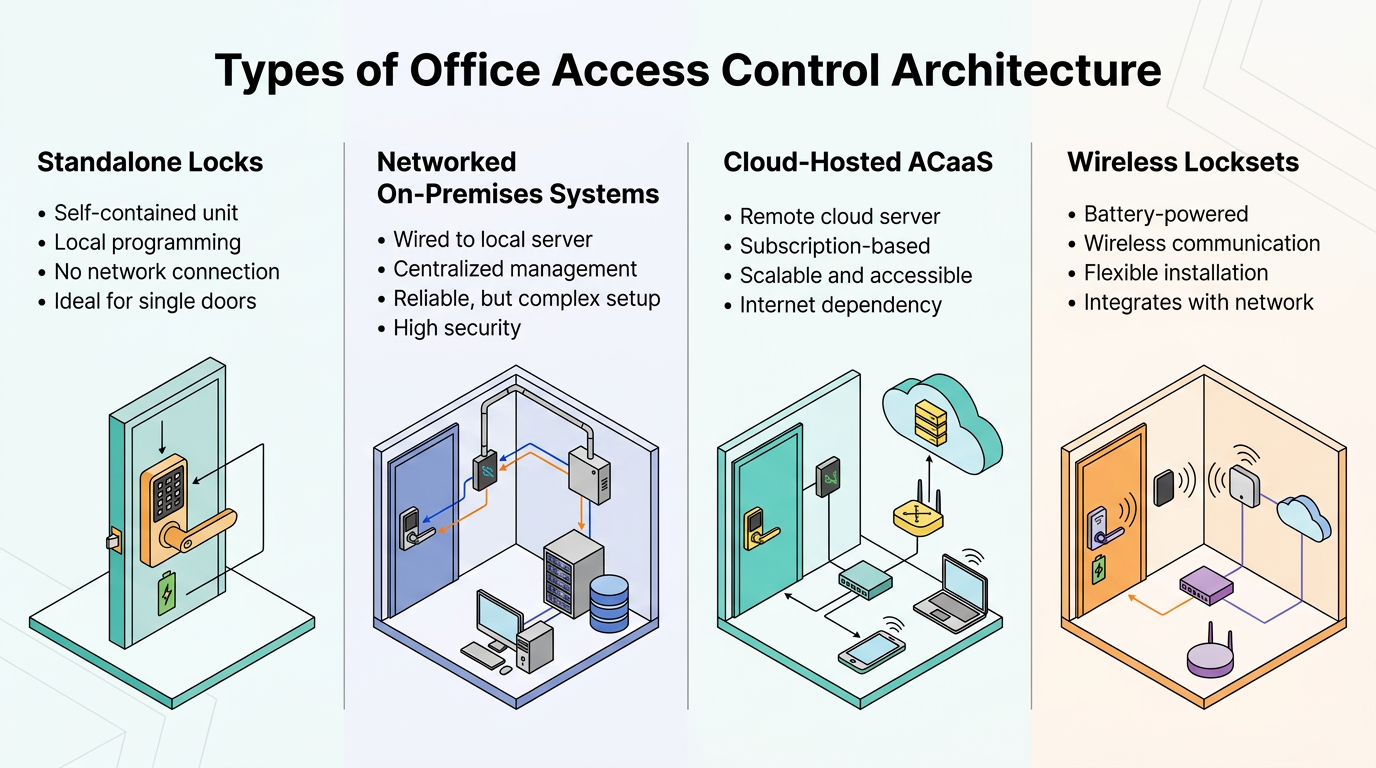
Setting Up Office Access Control
Planning, Design, and Rough-In
Design begins with a risk assessment and a site survey. The security team walks the floors with the departments occupying each space; those departments decide which interior doors need control. The output is a door schedule, which typically captures:
- A detail drawing for each door type
- Device locations on floor plans
- Point-to-point wiring
- The controller each reader reports to
Rooms holding cash, high-value inventory, or telecom and network equipment get electronic access control with a mechanical key override for emergency access.
Every electrified door must have its power-loss behavior specified as fail-safe or fail-secure based on the opening's hardware and applicable life-safety requirements. Stair doors and other egress paths typically release the lock on power loss, while sensitive interior rooms remain locked while preserving free egress from inside.
The reader-to-controller interface is part of the door's security boundary. The door schedule should identify whether each connection provides encryption and device authentication, and it should document line supervision. During commissioning, the integrator verifies the configured communication mode, tamper reporting, and reader-controller compatibility.
With the door schedule fixed, the rough-in follows it. The integrator hardwires new-construction doors. Cable ratings must suit the network and its power requirements as well as the installation environment, and the conduit must suit its location, whether plenum ceiling, exterior wall, or wet area. Where the design centralizes power, power supplies sit beside the access control panel rather than at the door. Controllers sit in telecom closets inside metal enclosures with spare capacity for growth. Where specified in the door schedule, readers mount at the project-specific height, and public-area devices use tamper-resistant hardware.
Commissioning and Ongoing Administration
Once the devices are mounted and terminated, acceptance testing should validate each controlled opening and confirm expected event handling during a host outage. The test plan should cover normal grants, denied reads, forced-open and held-open conditions, and synchronization of locally stored events after connectivity returns. Commissioning also verifies fire alarm release, intrusion tie-ins, and video integration, with signed written results delivered to the owner.
After handover, administration determines the system's value. Ongoing administrator responsibilities include:
- Authorizing access by individual job function and revoking it immediately at termination or transfer, ideally through an HR-driven feed
- Registering and logging visitors, issuing expiring badges, and collecting them on departure
- Auditing cardholder access rights against current roles on a defined schedule
Pairing Access Events with Video Verification
A DFO or DHO alarm tells the GSOC operator that a door state changed; it does not tell them why. Correlating each access event with the corresponding camera view lets the operator confirm whether a propped loading-dock door reflects a scheduled delivery, an after-hours maintenance task, or an unauthorized entry. Video verification cuts nuisance dispatches, shortens the path from alarm to decision, and gives investigators a defensible record when an event escalates.
Design the Door Chain from the Controller Outward
Effective access control design starts at the controller and works outward. Cardholder rules and schedules live in the software, but the parts that actually protect the door, reader communication, offline behavior, and power-loss response, are set through controller configuration, protocol choices, and fail-safe or fail-secure hardware. Confirm the reader interface protects card data, controllers cache permissions and events as intended, and locks behave the way the door schedule specifies. Then test every opening before handover.
Frequently Asked Questions
What is the difference between fail-safe and fail-secure locks, and how do you determine which one to use for each door in an office?
Fail-safe locks release on power loss, allowing egress. Fail-secure locks remain locked. Codes require that stairwell and exit doors allow free egress and that certain locking arrangements release under specified conditions, but they do not impose a blanket requirement that all such doors use fail-safe locking on power loss. Fail-secure suits data centers where unauthorized entry during outages poses greater risk than delayed egress.
How do you ensure office doors remain operational during a cloud or network outage, and what should you verify about locally cached permissions?
Verify controllers store current permissions locally and make grant-or-deny decisions using cached data during network outages. After connectivity returns, confirm the system automatically synchronizes offline door events to the management platform without manual intervention or data loss.
What are the security risks of using legacy 125 kHz proximity cards, and what does a migration to contactless smart cards involve?
Legacy 125 kHz proximity cards transmit unencrypted static identifiers that attackers can clone with readily available tools. Migration requires replacing readers and controllers, reissuing credentials, and reconfiguring software to support encrypted authentication protocols that prevent replay attacks.
