Wireless Access Control: Is It Ready for Enterprise Security?
Wireless access control cuts installation costs, but not every door should go wireless. Learn which openings suit battery locks and which require wired reliability.
Wireless access control cuts cable runs and speeds up retrofits, but the word "wireless" covers many different designs, and they don't all behave the same way when a lockdown order, a revoked badge, or a forced-door alarm must reach the door in seconds. The real question for enterprise teams is simple: which doors can go wireless, and which ones shouldn't?
Key Takeaways
- Wireless access control works well on low-traffic interior doors and retrofit openings, but perimeter entrances and doors that need instant lockdown should stay wired when every second counts.
- Battery-powered locks save energy by turning off their radios between check-ins, which means they can't hear an emergency lockdown or a revoked-badge command while they're asleep.
- Public research on Bluetooth locks and older key cards shows that most breaks came from sloppy implementation and poor key handling, not from weak encryption on paper.
- Offline locks that only sync now and then can't feed real-time video verification or artificial intelligence (AI)-based tailgating detection, since those tools need events the moment they happen.
What Is Wireless Access Control?
Wireless access control manages who gets through a door without running data cables all the way to the lock. Instead of wiring each door back to a central controller, the lock talks to the rest of the system over a radio link, using protocols like Wi-Fi, Bluetooth, or a mesh standard.
Most wireless locks run on batteries, make access decisions at the door or through a nearby hub, and report events back to a head-end for logging and monitoring.
How Wireless Locks Reach the Head-End
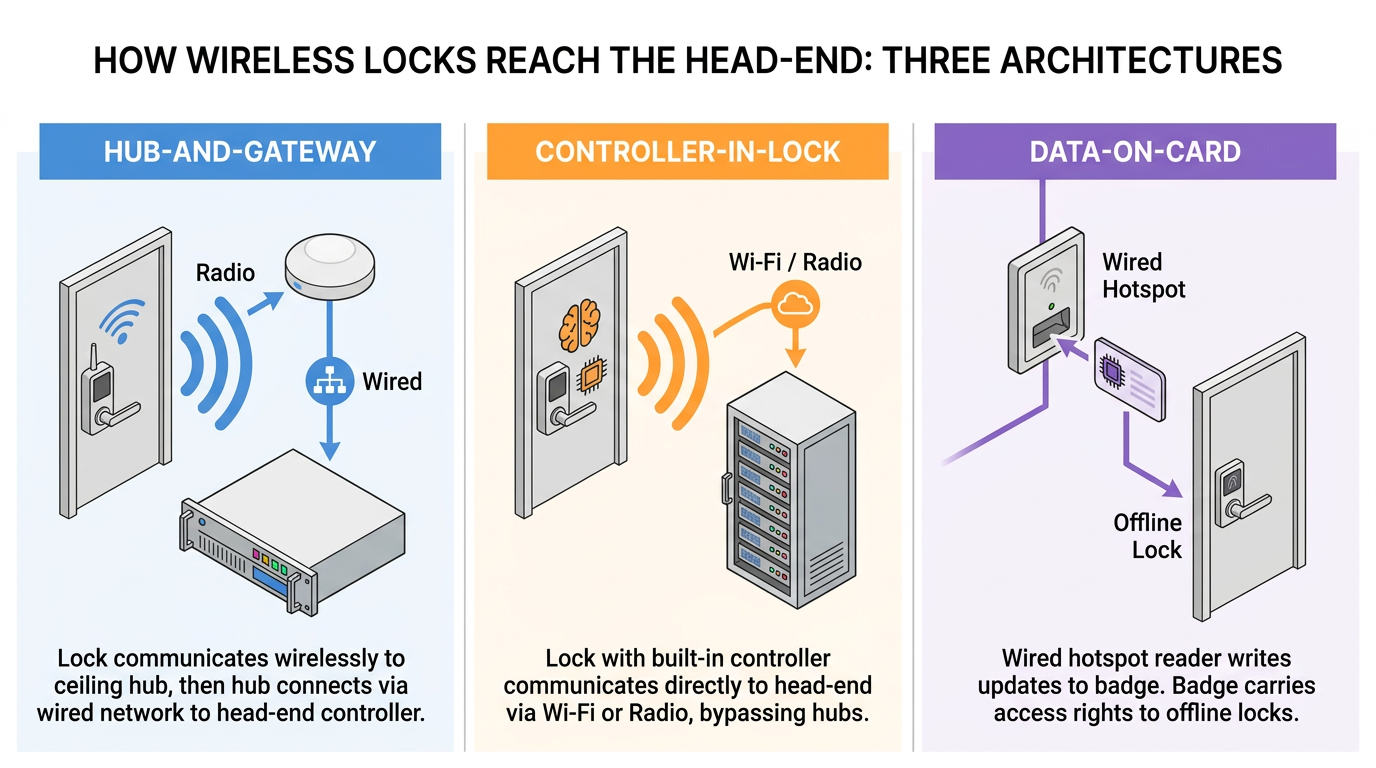
There are a few common ways enterprise wireless access control systems are built, and each puts the "brains" in a different place:
- Hub-and-gateway. The lock chats over short-range radio with a hub tucked above the ceiling, and the hub wires back to a traditional access controller. The controller stays put; only the last stretch of cable to each door goes away.
- Controller-in-lock. The lock itself decides who gets in, then reports back to the head-end over radio or Wi-Fi.
- Data-on-card. Most locks stay offline and run on batteries. Wired "hotspot" readers at main entrances write fresh access rights onto each person's badge, and the badge quietly carries those updates to the offline doors as people walk around the building.
Day to day, the protocol choice matters. Wi-Fi locks lean on the wireless local area network (LAN) you already have, and each one may need its own network address. Different radios reach through walls differently, and some let you manage more doors per network address than others, which changes the load on information technology (IT).
Bluetooth Low Energy (BLE) and near-field communication (NFC) handle the handshake between a phone and the reader, while other protocols handle the link between the lock and the head-end. It's common to mix wired readers with a couple of wireless protocols on the same head-end.
The Lockdown Gap Between Online and Offline Locks
How quickly a command reaches the door depends on which setup you choose, because many battery-powered locks save energy by sleeping between scheduled check-ins. If the lock fully shuts off its radio while it's sleeping, it simply can't hear the head-end. Locks that stay half-awake or wake up on demand behave differently, so each product needs its own latency test.
Check-in intervals can add seconds, minutes, or even longer to an urgent command. Wired locks don't have this sleep problem. Lockdown plans should focus on locking things down fast in the first few minutes of an incident, which lines up with K-12 school safety guidelines.
Revoking a lost badge works the same way. A wired controller can kill a badge right away, without waiting for anything to wake up. On an offline or data-on-card lock, that badge might still work until the next sync, or until updated rights hitch a ride on another person's card. Vendor marketing doesn't always spell this out, and "wireless" gets used to describe both locks that report events instantly and locks that only publish a log every so often. For a physical security operations center (PSOC), those are two very different products.
Documented Attacks and What They Share
Several public reports on wireless locks and credentials show the same pattern: the encryption looked fine on paper, but the implementation was broken. The attack record tells you exactly what to test. It falls into two buckets: attacks on the Bluetooth radio itself, and attacks on the credential.
Replay and Relay Against Bluetooth Locks
Researchers found that a popular Bluetooth deadbolt reused the same nonce (a one-time value that should change every session) at the start of every unlock. An attacker could record a real unlock command and replay it later to open the door, even though the vendor advertised NIST- and FIPS-approved algorithms. Test that each session uses a fresh nonce and that recorded traffic can't reopen the door.
A relay attack is different. It doesn't record anything; it just passes a live handshake between two devices across a longer distance, fooling the system into thinking the phone and reader are close together. Since BLE and NFC handle that handshake, test relay resistance separately from replay protection.
Cloned Credentials and Protocol Downgrades
If you still use legacy proximity cards, evaluate them separately from stronger authentication options and include every affected component in the migration plan. Mesh protocols add downgrade risk: Z-Wave's older S0 class uses a fixed temporary key during pairing, and devices that support both S2 and S0 can be forced down to S0.
So ask for proof of good key handling. Each session should use a fresh nonce, with no hardcoded or shared keys. Where policy or regulated deployment criteria demand it, validate cryptographic modules under FIPS 140-3. An algorithm name on a spec sheet isn't proof the keys are handled well.
Where the Perimeter Stays Wired
Wireless access control still makes sense because a smart, mixed setup can keep the risky parts wired. A risk-based design sorts the doors by how much is at stake:
- Wired controllers belong on exterior doors, perimeter doors, high-traffic main entrances, and any door where a lost badge has to stop working right away.
- Wireless locks are a good fit for interior doors and retrofits, including storage rooms, offices, medication cabinets, and server racks, places where running cable would be overkill.
- Fire-rated doors need code-compliant hardware and proven exit and alarm behavior, whether you go wired or wireless.
The split is a deliberate design choice, not a compromise. A storage closet can live with a slower revocation; a data center entrance can't.
Installation cost pushes the same way. Wireless locks save a lot of labor and time on retrofits, because you skip the drilling and conduit work that makes wired retrofits so painful in older or occupied buildings. The trade-off comes after installation. Every wireless lock runs on batteries, so it needs health monitoring and a real schedule for swapping batteries over its lifetime. Its firmware also needs a plan for secure updates.
Battery life shifts with the environment and how busy the door is, so cold spots or high-traffic openings may need more frequent service than a one-size-fits-all schedule allows. Teams that treat installation as a one-time project and skip the ongoing operations plan tend to end up with locks that quietly die on them.
Standards That Mark Enterprise Grade
The mixed pattern tells you where wireless belongs; standards tell you which products deserve the wireless slot. The Open Supervised Device Protocol (OSDP), published by the Security Industry Association and adopted worldwide as International Electrotechnical Commission (IEC) 60839-11-5, supports supervised wiring, which means the panel gets an alert if a reader is tampered with or pulled off the wall.
When it's supported, enabled, and configured correctly, OSDP Secure Channel protects the wire between the reader and controller with Advanced Encryption Standard (AES)-128 encryption. OSDP doesn't cover the wireless link between the lock and the hub, though, so an OSDP-verified reader tells you nothing about how the lock itself talks. In short, OSDP certification alone isn't enough to answer the wireless question.
The Connectivity Standards Alliance filled a big gap in February 2026 when it released Aliro 1.0, a shared spec for digital wallet credentials and access control readers. It supports NFC, and its radio options are BLE and ultra-wideband (UWB).
Feeding Wireless Doors into Video and AI Monitoring
Once certification narrows the list of products, the next step is testing how well each one plugs into the PSOC and the workflows your team actually runs. Access events get a lot more useful when you pair them with video. A door-forced-open alarm or a denied badge can automatically pull up the nearest camera feed, so an operator can see what happened before and after. That only works if the event shows up right away. Online wireless locks can push door events to the head-end as they happen; offline locks only publish their log later. That delay can knock offline locks out of real-time video verification altogether.
AI-based tailgating detection has the same dependency. Anti-passback can't catch a tailgater, because the tailgater never scans a badge in the first place. AI cameras can close that gap by comparing how many people walked through the door with how many badges were used, and flagging anything that doesn't add up for the operator to review. Context matters a lot here. A facilities contractor propping a mechanical-room door open during a scheduled maintenance window is normal work; the same door propped open after hours, with no work order behind it, warrants a closer look.
That kind of reasoning requires a unified data layer that ties access events, video, and facility schedules together, and a wireless lock that only syncs every so often can't feed timely events into it.
Deciding Readiness Door by Door
Wireless access control is ready for enterprise use once security teams turn broad requirements into concrete, door-by-door targets. For each opening, set clear goals for command response, credential revocation, event delivery, battery service, and integration. Keep the wired connections where instant action is a must, and use online or offline wireless locks wherever their real-world behavior clears those targets.
Frequently Asked Questions about Wireless Access Control
What latency targets should security teams set for wireless locks on different door types?
Map latency to each door's role in emergency response. Doors used in lockdown procedures or housing regulated equipment need defined authorization and measured response times. Interior retrofit openings with lower threat exposure can tolerate delays matching badge revocation policy.
What tests confirm a wireless lock's Bluetooth implementation resists replay and relay attacks?
Record a valid unlock transaction and retransmit it to verify the lock rejects replayed traffic through nonce rotation. Separately, run relay tests using RF extension hardware between credential and reader to confirm distance bounding blocks handshakes beyond proximity range.
How can teams integrate offline wireless locks with AI monitoring and video verification workflows?
Reserve offline wireless locks for lower-stakes interior doors where delayed logs do not compromise security posture. Run scheduled batch reviews of those logs against recorded video during audit windows rather than attempting real-time correlation the hardware cannot support.
How should teams plan battery maintenance across a wireless access control deployment?
Track battery health per opening rather than applying a uniform replacement schedule. Cold locations and high-traffic doors drain faster, so service intervals should reflect measured performance. Tie firmware updates to the same maintenance visits to reduce technician trips.
