Access Control for Retail: Securing Stores, Stockrooms & Distribution Centers
Learn how to zone retail spaces, manage stockroom credentials, meet PCI DSS and CTPAT requirements, and verify door events with video across every site.
Retail access control has an unusual job: protecting a building designed to welcome strangers. Customers walk through the front doors without a second glance, but a few steps past the sales floor, the space quickly turns private. The challenge is keeping the floor open and inviting while stockrooms, cash offices, and back-of-house operations stay firmly off-limits.
Key Takeaways
- Credential strength should rise with the risk tier, from controlled staff areas to individual high-value assets, while public entrances remain easy to enter.
- Shared keys and group PIN codes leave a stockroom opening with no individual audit trail tying entry to a named person.
- Distribution centers whose operators join customs and cargo-security programs commit to positive identification at every entry point and periodic access review.
- Video verification helps operators determine the cause and priority of a door alarm as it arrives.
Zoning the Store from Sales Floor to Cash Office
Retail security starts with a simple idea: not every door carries the same risk, so not every door should carry the same lock. A store is really a stack of spaces with different stakes, from a wide-open entrance to a small room holding the day's cash. Mapping those spaces into zones gives the access control program shape and tells operators where to focus.
A practical retail zoning model starts with the public sales floor and moves to controlled staff areas. Individual high-value assets receive the tightest control. In this model:
- Zone 3 is the entrance and sales floor.
- Zone 2 covers category areas such as stockrooms, fitting rooms, and staff break areas.
- Zone 1 covers specific assets, including the register, cash office, and server closet.
Access control concentrates at the line between Zone 3 and everything behind it, so the floor stays open while every door leading off it reports to the physical access control system (PACS).
A utility closet may use a keypad. Stockroom doors require tighter control, while cash offices may warrant credentials designed for stronger individual accountability. These choices set credential strength by risk tier. Cash office doors remain locked. Managers limit entry to cashiers and named authorized staff, while cash not in active use goes into a bolted-down drop safe.
An employee entrance may use an exterior card reader. On the inside, a delayed-egress lock holds the door for a set delay after someone pushes the bar, giving staff time to respond before the person exits.
That configuration is only permitted where the fire and building codes allow it under NFPA 101, and the local authority having jurisdiction, usually the fire marshal, must sign off before it goes live. Emergency exits in low-traffic corridors get exit-control alarms because an unmonitored back door is an easy path out with unpaid merchandise.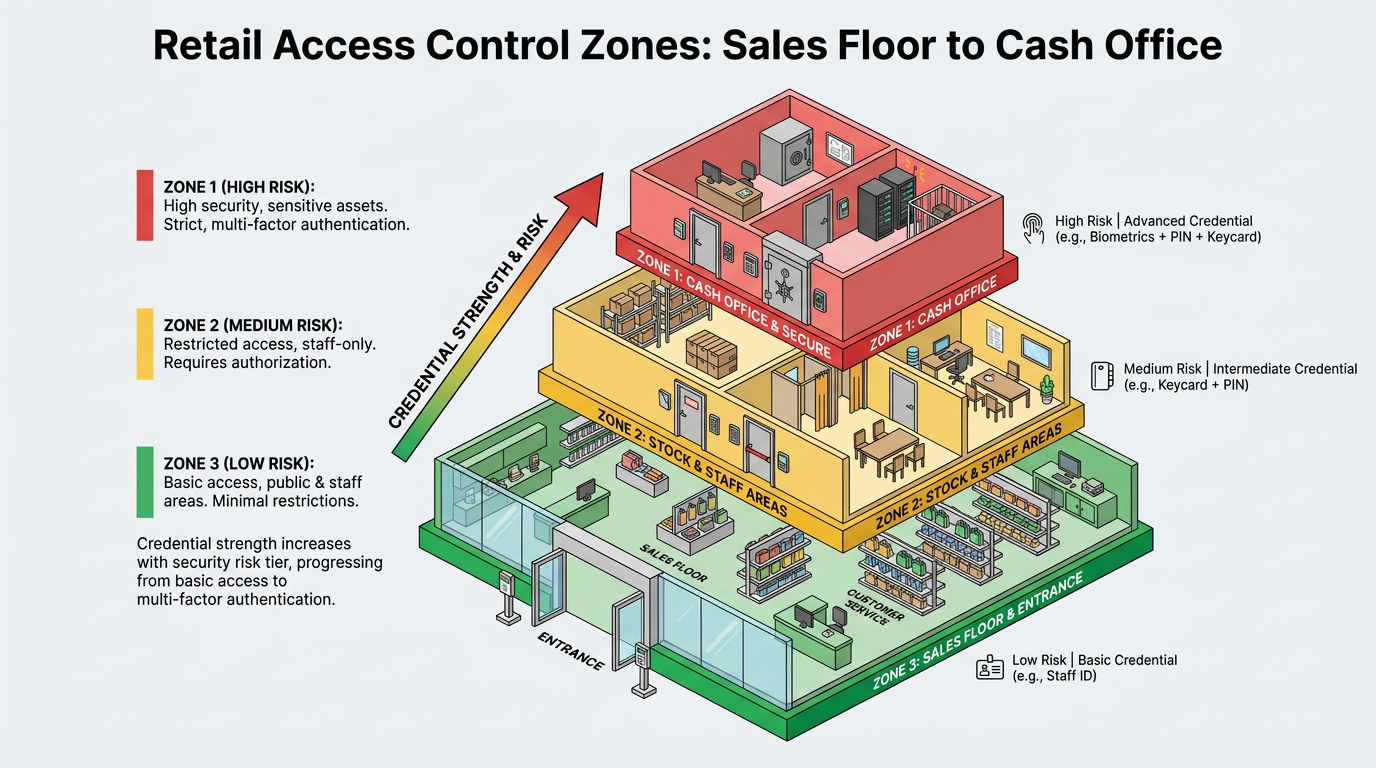
Stockroom Credentials, Roles, and Access Reviews
The stockroom is just behind the Zone 3 line, and credential choice determines the quality of the resulting access audit trail. Individually assigned credentials produce a timeline tied to each entrant for comparison with inventory counts; shared keys and group PINs produce no individual record.
Store managers have all-hours access to the cash office, stockroom and server closet. Sales associates reach the break room and floor during scheduled shifts, while warehouse associates reach inventory areas but not the finance office. That mapping of permissions to job role, rather than to the individual, is role-based access control (RBAC), and it is how most PACS platforms are administered.
Seasonal hiring is the stress test, because when a dozen temporary workers start the same week, the shortcut is to grant every new hire the same broad stockroom access instead of tailoring permissions to each role.
Retail's turnover rate makes revocation the routine to get right. Annual access reviews are too infrequent for a workforce that churns fast and can leave departed employees holding live badges for months.
A quarterly access review, run by store or district managers against a current roster, catches badges that slipped through revocation, role changes that were never reflected in permissions, and seasonal hires whose access should have expired at the end of their term.
HR and PACS integration shortens the window further by deactivating a badge the moment the employee's separation takes effect in the HRIS, so the review becomes a process check rather than the primary control.
Distribution Center Access Under CTPAT and TAPA FSR
Controls at the receiving dock and distribution center (DC) perimeter protect freight against cargo and supply chain theft. They must cover people, credentials, doors, and high-value inventory.
The Customs Trade Partnership Against Terrorism (CTPAT), administered by U.S. Customs and Border Protection, provides Minimum Security Criteria for participating entities' facilities. Operators can apply those principles through several practices:
- Positive identification of employees, visitors, and vendors at entry points, backed by an employee identification system.
- Documented access-device procedures that govern how keys and cards are issued, replaced, and removed, with immediate revocation at termination.
- Photo identification and temporary badges for visitors, who remain escorted in restricted areas.
Warehouses using the Transported Asset Protection Association's Facility Security Requirements (TAPA FSR) can organize controls by graded security levels. Practical measures include controlled access between offices and docks, with card or intercom access at higher-security locations. Forced-door and held-door alarms provide another measure.
Operators should review access lists periodically. High-value cages should be enclosed on every side, including the roof and kept locked. Cameras should cover the entrance and interior.
Payment Areas Under PCI DSS Requirement 9
Inside a store, the cardholder data environment usually lives in a back-office room housing the point-of-sale server, the network switch, and any router carrying payment traffic. PCI DSS Requirement 9 treats that room like a small vault. It calls for appropriate physical entry controls, camera coverage or an access control mechanism to monitor access to sensitive areas, and visitor controls requiring escorted guests to be logged and issued expiring badges while inside.
The register counts too. Skimmers and swapped terminals are a live threat, so retailers keep a running inventory of every point-of-interaction card reader by make, model, serial number, and location in the store, then walk the floor on a set cadence to confirm the device on the counter is the one that belongs there.
Inspections should look for the physical tells of tampering, including a broken or missing tamper seal, an extra cable running from the device, or a casing that does not match the reference photo on file. A documented risk analysis sets how often those inspections happen.
Door Events, Video Verification, and Worker Safety
Those physical entry controls only pay out if someone reads the events they generate. Door Forced Open (DFO) events fire when the door position switch shows the door open without a matching access-granted event, which can point to forced entry or a faulty Request-to-Exit (REX) sensor. Door Held Open (DHO) events fire when the door stays open past a preset timeout. These abnormal door states can become nuisance alarms when staff prop back doors for trash runs and pallet moves.
Door-event severity depends on the schedule and credential log. Video supplies additional context. A dock door held open at a DC while a pallet jack moves inbound freight during a scheduled receiving window is routine. The same door opening after the last scheduled carrier has left is a DFO worth pulling video on at once if no badge read occurs and the dock calendar is empty.
Without integrated context, the door-position events may look similar, but the credential log differs when no badge read occurs. Neither record alone reveals tailgating, where a second person slips through the stockroom door behind a badged employee, or piggybacking, where the employee knowingly holds it open.
A supported PACS and VMS integration can push the alarm, cardholder name, door name, and timestamp into the video interface, so the operator sees footage as the alarm lands and can acknowledge it or mark it false. Where the integration supports operator command functions, an authorized operator may also lock the door from the same screen. Some systems use people-counting detection to compare the number passing through a door with each badge read and raise a mismatch the reader never registered.
The same camera feeds that verify door events also carry the signal for worker safety. More than one in three retail workers report feeling unsafe on the job, and reports of physical assault and aggression from coworkers and former employees have risen sharply year over year.
AI-powered behavioral detection on existing cameras can flag fights, weapon draws, or escalating confrontations at the register, in back rooms, or along dock corridors, routing the alert with live footage so an operator can dispatch response or trigger a lockdown before an incident spreads.
Running Access Control Across Hundreds of Sites
A multi-site chain must decide where to keep its system of record. Some traditional multi-site on-premises deployments require site-level servers, licensing, credential synchronization, and patching. Cloud-managed systems run issuance and revocation from one console. They also centralize audit reporting.
Systems with an edge controller that caches the credential database can continue making local access decisions through a wide area network (WAN) outage. A chain may also use different architectures at selected high-security and distributed locations, depending on its security and operational needs. The total cost of ownership can determine the split.
Centralized administration and stronger encrypted credentials improve multi-site control. Administrators issue and revoke mobile credentials remotely, and near-field communication (NFC) credentials in Apple Wallet and Google Wallet tap like a card, though card stock stays a fallback for phones that lack support. A reader refresh is also a chance to evaluate migrating away from legacy proximity credentials vulnerable to cloning.
Biometric Readers Under State Privacy Law
Biometric readers are a common upgrade on high-risk doors like cash offices and server closets, where individual accountability matters most. The tradeoff is that fingerprints and face templates carry legal exposure that cards and PINs do not, and a multi-state footprint can place identical readers under different obligations in each jurisdiction.
A handful of states, including Illinois, Texas, and Washington, have stand-alone biometric statutes, and Illinois stands out because its law is enforceable through a private right of action with statutory damages per violation. Many more states regulate biometric data as sensitive data under comprehensive consumer privacy laws, which generally require opt-in consent before processing.
Before collecting fingerprint or face scans, a chain should obtain legal review covering informed consent before enrollment, a published retention and destruction schedule with a documented deletion procedure, and a policy on incident response, employee rights, and disclosure limits.
A chain putting fingerprint readers on cash office doors should map each applicable requirement under statutes like the Illinois Biometric Information Privacy Act before setting policy. Where the compliance load outweighs the accountability gain, a strong card credential paired with video verification will often meet the same operational goal on the same door.
Following the Merchandise from Dock to Register
The doors that matter in retail are the ones customers never use. A sound program matches credentials to each zone, revokes them promptly, applies relevant requirements from dock to payment area, and verifies door events with video. Start by auditing every door still opened by a shared key or group code, then test who can enter and how each alarm is reviewed.
Frequently Asked Questions
How do you integrate HR systems with a physical access control system (PACS) to automatically deactivate badges when employees are terminated or seasonal contracts end?
Most PACS platforms integrate with HRIS through API connections or middleware monitoring employee status. When termination triggers in HR, the integration pushes a deactivation command to PACS, revoking door permissions immediately without manual intervention by managers or administrators.
What are the best practices for reducing nuisance alarms from door forced open and door held open events at loading docks without compromising security?
Set time-based alarm thresholds that adjust to scheduled receiving windows and extend timeout intervals during high-traffic periods. Pair this with badge swipe verification at dock entry points to ensure alarms trigger only when openings lack matching credential reads during expected operational periods.
What are the practical alternatives to biometric readers for achieving individual accountability at high-risk doors like cash offices in states with strict biometric privacy laws?
Issue strong encrypted credentials like smart cards or mobile credentials paired with video verification that captures face and timestamp at door events, combined with tight revocation workflows and quarterly access reviews to maintain individual audit trails without biometric enrollment.
