How to Build an Access Control Plan: Scope, Zoning, and Policy
Learn how to scope, zone, and write a physical access control plan that handles credentials, role permissions, and audits across your facility.
An access control plan is the written record that decides who can enter which spaces, what credential they need at each door, and how those permissions are granted, changed, and revoked over time. Done well, it absorbs new hires, terminations, and reorganizations without leaving gaps. Done poorly, it turns every staffing change into a quiet exposure that only surfaces when an alarm no one can explain forces the question.
Key Takeaways
- Score each facility separately, so its access controls reflect local conditions and threats.
- At an inner boundary, strengthen authentication and give operators video context for unusual entries.
- Build each role from job duties and authoritative identity records, then constrain it by approved locations and working times.
- Keep permissions current by reconciling active badges with personnel changes. Review recurring door alarms as a separate control.
What Is an Access Control Plan?
A usable access control plan is the written record of which facility areas are protected and who may enter each one. It sets the credential each boundary requires and explains how teams manage and revoke access. No standards body publishes a universal template, but the Interagency Security Committee (ISC) Risk Management Process and ASIS physical asset protection guidance cover the core contents through risk-based facility security and lifecycle management.
Administrators use the plan to build access levels in the physical access control system (PACS). Integrators use it to decide which doors need stronger authentication. Operators use it to judge what an authorized entry looks like.
How to Define the Scope of an Access Control Plan
Planners define what the plan protects. A common approach is to score risk by multiplying asset value by threat and vulnerability ratings, grouping assets into critical functions and critical infrastructure. Federal facilities apply the ISC matrix to assign a Facility Security Level from I to V, and enterprises outside government can borrow the same approach. Score each site of a multi-site portfolio separately, because the level is assigned per facility.
Assign owners before design starts:
- Human resources (HR) owns separation and transfer notices, while the identity team maintains user records.
- Facilities owns doors and hardware.
- Each tenant or department approves access to its own space.
Classify employees and long-term contractors as permanent credential holders. Require visitors to authenticate, remain escorted, and present verified identity documentation. Applying one set of rules to both groups will either over-verify staff or under-verify guests.
How to Zone a Facility for Access Control
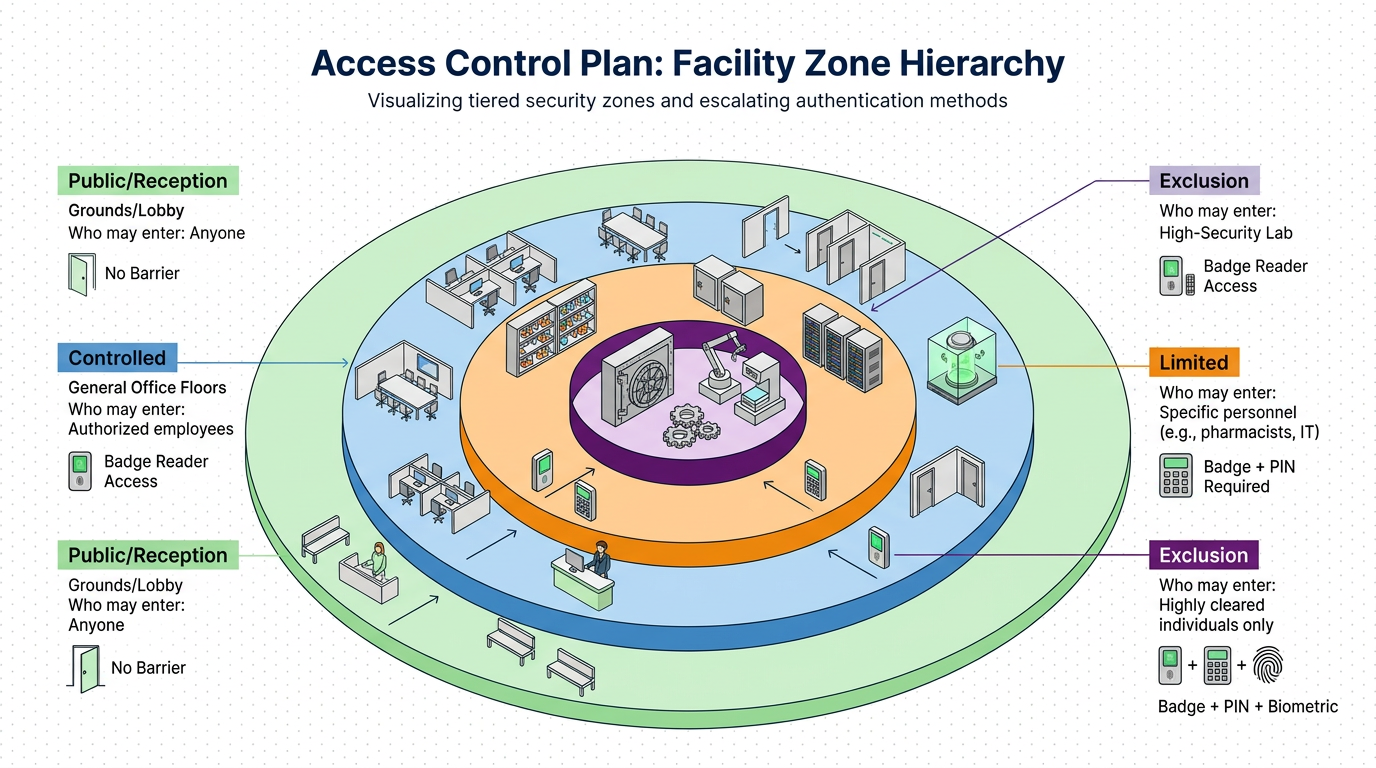
After planners score risk, protected space can be classified into Controlled, Limited, and Exclusion areas under NIST SP 800-116. Exclusion areas carry the strongest restrictions, and authentication becomes progressively stronger as the corresponding impact level rises from LOW to MODERATE to HIGH.
Controlled areas admit anyone with proof of affiliation, such as an agency badge. Limited areas admit functional subgroups or roles. Exclusion areas admit only individually authorized people.
Commercial sites often add an outer reception zone covering grounds, lobbies, and the visitor contact point, none of which are secure for protected assets. Inside sits an operations zone for staff and escorted visitors, followed by a security zone and then a high-security zone. Each is open only to people cleared for the surrounding zone.
Layered controls slow or stop an adversary's progression, and the outer perimeter can run at lower security so resources can focus on critical assets. For a pharmacy inside a hospital or a server hall inside a data center, the exterior door can use a badge while the inner door requires a badge plus a personal identification number (PIN) or biometric.
| Zone | Example spaces | Authentication | Who may enter |
|---|---|---|---|
| Public/reception | Grounds, lobby | None | Anyone |
| Controlled | General office floors | Badge | Anyone with proof of affiliation |
| Limited | Hospital pharmacy, data center server hall | Badge plus PIN or biometric | Functional roles |
| Exclusion | Vault, controlled-substance cage | Badge plus PIN plus biometric | Individually authorized people |
How to Map Roles and Permissions to Each Access Zone
Zones define the boundaries, but roles determine who crosses them. Under NIST SP 800-53 Rev. 5 control PE-2(1), organizations assign physical access by position or role, such as routine maintenance personnel, duty officers, or emergency medical staff. Each role should carry only the access its tasks require, with periodic review and removal when that access is no longer justified.
The identity management system should be the authoritative source for user records. Plan access levels before provisioning anyone.
Write time and location into the role definition. Time- and location-based role access controls allow the PACS controller to grant entry only when both conditions are met. A night-shift technician's role carries server-hall access valid only during that shift, so the same badge fails at midday.
How to Write a Physical Access Control Policy
- Credential issuance starts with an approved authorized access list. Issue credentials from that list and remove individuals when access is no longer required.
- Visitors and contractors need controlled, traceable entry. Authorize them in advance and issue an expiring visitor token. Collect it at departure, then record the host and visit time.
- Lost and stolen credentials need a defined revocation deadline. Federal Personal Identity Verification (PIV) cards follow FIPS 201-3, which requires normal revocation after notification and emergency procedures where any delay is unacceptable. The plan must set its own deadline for non-federal badges.
- Termination and transfer require immediate access review. Retrieve all physical access credentials at separation, re-confirm operational need after role changes, and notify the security office of the separation meeting time before it happens.
- Exceptions need defined ownership, expiration, and an escalation path. The policy should identify who may approve a temporary access grant and how long it remains active. It should also route forced-door, held-door, and denied-badge alarms at an Exclusion area.
Access Control and Surveillance Planning for Every Zone Boundary
A badge reader records the credential presented. To identify the person following the badge holder, cameras are needed at zone transitions. Placing those cameras during zoning gives operators visual context for each entry event before the hardware configuration is finalized.
At the transit point, AI-powered video intelligence can alert operators when more people cross than a credential event authorizes. Correlating reader events with the door state lets operators compare both against the people visible at the boundary. An extra person can then trigger a tailgating alert.
The ONVIF Door Control Service Specification standardizes held-door, forced-door, and door-tamper events, so operators can link those alarms to the camera covering the affected boundary and verify what happened.
A pharmacy technician holding the door for a colleague pushing a medication cart at shift handoff is routine. The same held door overnight, with no cart and no visible badge on the second person, deserves operator attention. Human verification of real-time detections reduces false positives and keeps the operator in the decision loop.
Access Control Plan Examples for Common Facility Types
The same planning method produces different controls when the facility and operating conditions change.
Access Control Plans for Corporate Offices
Corporate offices prioritize a layered approach that serves multiple tenants. The shared lobby can remain a reception zone while each tenant's floor becomes its own Controlled or Limited area approved by that tenant.
Access Control Plans for Hospitals and Healthcare Facilities
Hospitals prioritize role-based validation with visitor control. Access control, validation, and a facility security plan are addressable HIPAA specifications under 45 CFR 164.310. Pharmacies and infant and pediatric units are among the security-sensitive areas addressed by the IAHSS design guidelines.
Access Control Plans for Manufacturing and Chemical Plants
Manufacturing and chemical plants prioritize perimeter control and often screen people and vehicles, making vehicle gates a zone boundary with their own screening rule. With federal CFATS authority lapsed, plants set the remaining requirements through their own programs and voluntary chemical security resources.
Access Control Plans for Data Centers
Data centers often use box-inside-a-box layered security, with cameras and access review at inner boundaries. Server rooms processing cardholder data require appropriate physical entry controls, such as video monitoring or access-control mechanisms, under PCI DSS Requirement 9.
Creating an Access Control Implementation Plan
Implementation is where a well-scoped plan either becomes operational muscle memory or collapses under the weight of legacy systems, inconsistent training, and half-migrated credentials. Sequencing matters as much as the substance of each step.
Sequence the Rollout by Risk, Not by Convenience
Start where a failure would hurt most. A risk-prioritized first rollout should cover research labs and executive suites and server rooms, then work outward as legacy cards phase out elsewhere. Piloting in the highest-risk zones surfaces the hardest integration problems early, when the team still has room to redesign, and gives leadership defensible evidence that the plan works before it goes wide.
Configure Authentication Modes and Provisioning From a Single Source
The project team should confirm planned authentication modes for each zone, use dual-technology readers during migration so both old and new credentials work at the same door, and configure PACS access levels directly from identity system records rather than manually.
Pulling access levels from the identity system prevents the two most common sources of drift at go-live: a badge that carries permissions the user's role no longer justifies, and a role that was provisioned in one system but never mirrored in the other.
Train Each Audience on What They Actually Do
Facility managers, maintenance staff, and occupants each need role-specific training. Managers need the escalation path and the exception process. Maintenance needs the hardware failure modes and the reporting chain.
Occupants need the visitor and tailgating rules, plus the practical behavior expected at each zone boundary. Deliver each of these before the pilot goes live, not after. Training that arrives with the first alarm is training the operators cannot use.
Run Old and New in Parallel Until Verification Closes
Cutover is where migrations most often fail. The team should keep the legacy system running alongside the new one until every door, every reader, and every role has been verified end to end. Once verification is complete, retire legacy readers and secondary credentials used only during migration. Leaving them active turns them into permanent side channels that bypass the plan.
How to Audit and Update an Access Control Plan Over Time
Once pilot zones are live, set a review cadence. Most standards leave access list review frequency as an organization-defined parameter, but the Department of Defense's assigned CMMC value of at least annually, plus review after any significant incident or change in risk, sets a reasonable floor for any enterprise.
Audit log analysis catches drift that an access list review misses. Start with orphaned credentials by reconciling active badges against HR separation records and reporting the results to executives.
Following SIA guidance, filter forced-door and held-door alarm rates by location and timeframe, then examine individual patterns to find where zoning fails in practice. Track nuisance alarm rates and per-operator outcomes alongside them.
Turn Every Door Decision Into Defensible Action
Security leaders gain the most value when they treat the plan as a living decision record. Operators should be able to explain each admission and alarm escalation. The record should also identify who approved each exception. When recurring alarms or orphaned credentials appear, the responsible team can trace the failed handoff and correct it. That discipline turns daily access events into evidence for better decisions. Keep testing the plan against real behavior so the next operational or threat change strengthens operations instead of creating another gap.
Frequently Asked Questions
How do you practically reconcile active badges against HR separation records to identify orphaned credentials, and how quickly should revocation happen after an employee departure?
Pull badge enrollment data from the PACS and match it against the authoritative employee roster in the HRIS or identity system, flagging any badge without a corresponding active record. Most organizations revoke within twenty-four hours of departure.
What specific authentication combinations (badge, PIN, biometric) are recommended for each access zone level, and how do you decide when to escalate from single-factor to multi-factor authentication at a boundary?
Escalate to multi-factor when unauthorized entry consequences justify added friction. Combine badge plus PIN or biometric at inner boundaries protecting high-value assets. Add a third factor only when the protected space carries regulatory liability or catastrophic operational impact. Match authentication strength to breach response requirements.
How do you effectively manage the parallel operation of legacy and new access control systems during migration without creating permanent security gaps or side channels?
Set a verified-door-by-verified-door retirement deadline at project start, track remaining dual-credential doors weekly, and physically disconnect legacy readers once each zone passes end-to-end validation rather than leaving them powered indefinitely as a convenience fallback.
